
Day 1: Architecting a Reproducible Quant Dev Environment

A junior engineer sets up their trading system like this:
pip install alpaca-py pandas numpyThey hardcode their API key:
API_KEY = "PK_LIVE_ACTUALKEY123" # "It's fine, it's just for testing"They push to GitHub. Three months later, a dependency update silently changes pandas.DataFrame.resample behavior. Their 5-minute VWAP signal shifts by one bar. In backtest: invisible. In live trading: systematic entry at the wrong price. Six weeks of negative alpha before they notice.
This is not a hypothetical. This is the most common way quant systems die quietly.
The Failure Mode: Environment Drift and Credential Exposure
There are two compounding failure modes here:
1. Dependency Version Drift. NumPy 1.x and 2.x have different default dtypes for certain operations. Pandas 1.x and 2.x changed DataFrame.groupby return types. If your environment isn’t pinned and reproducible, your research results are not reproducible. A strategy that backtested at 1.8 Sharpe might run at 0.4 Sharpe in production because the production server installed a newer library version.
2. Credential Leakage. API keys committed to version control — even “sandbox” keys — establish bad habits. When you eventually work with live capital, muscle memory will betray you. Beyond that, Alpaca sandbox keys can be used to stress-test your logic in ways you didn’t intend if they leak to a colleague with different intentions.
The deeper issue: without a containerized environment, you cannot guarantee that python verify_setup.py on your laptop produces the same binary output as on a cloud VM running your strategy at 4am.
The AutoQuant-Alpha Architecture
We solve this with three layers:
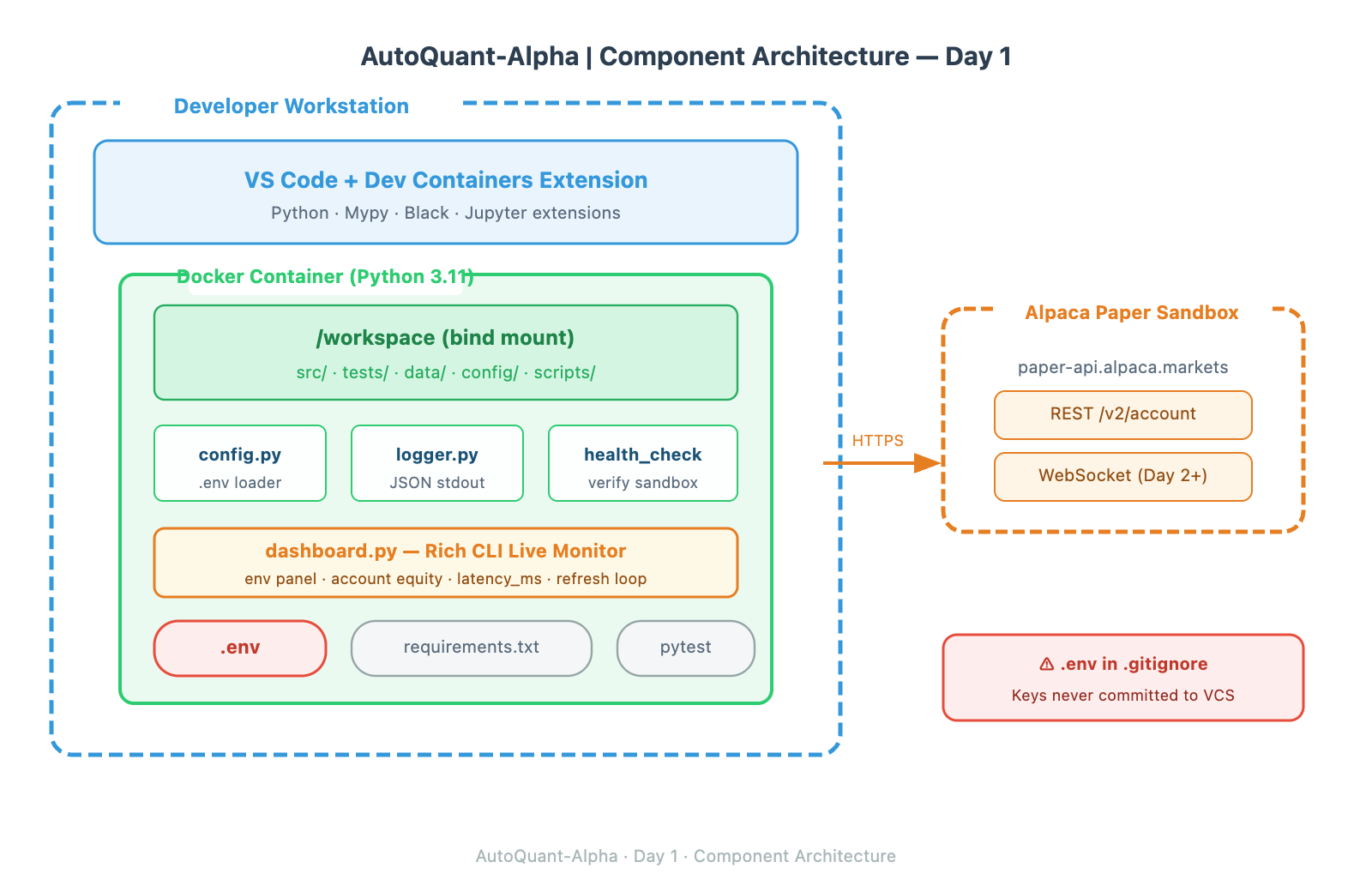
Layer 1 — The Container. Docker gives us a hermetic Python 3.11 environment. Every dependency is installed from a requirements.txt with pinned versions. The container is the unit of reproducibility. If it works in the container, it works anywhere that runs Docker.
Layer 2 — Secrets Management. API credentials live in .env, which is in .gitignore from day one. We load them at runtime using python-dotenv. The .env.example file is committed — it documents required variables without exposing values.
Layer 3 — Verified Connectivity. Setup is not complete until a health-check script successfully authenticates to Alpaca, fetches account equity, and logs a structured JSON response. “It’s installed” means nothing. “The sandbox returned account equity of $100,000 at 14:23:07 UTC” means you’re ready.
Implementation Deep Dive
Pinned Dependencies with Hash Verification
Standard pip install trusts PyPI. Production systems don’t. We generate a locked requirements file:
pip-compile --generate-hashes requirements.in -o requirements.txtThis means even if PyPI is compromised and a malicious version of a package is uploaded, pip install --require-hashes will reject it. For a trading system, this isn’t paranoia — it’s table stakes.
Structured Logging from Day One
Every script in AutoQuant-Alpha logs to stdout as newline-delimited JSON. Not print statements. Not f-strings to stderr.
import logging, json, sys

class JSONFormatter(logging.Formatter):
    def format(self, record: logging.LogRecord) -> str:
        return json.dumps({
            "ts": self.formatTime(record),
            "level": record.levelname,
            "msg": record.getMessage(),
            "module": record.module,
        })
Why? Because when your strategy is running in a Docker container on a remote VM and something goes wrong at 3am, you’re grepping logs. Structured logs are grep-able, parseable, and ingestible by any observability stack (Grafana Loki, Datadog, CloudWatch) without modification.
The Health Check Pattern
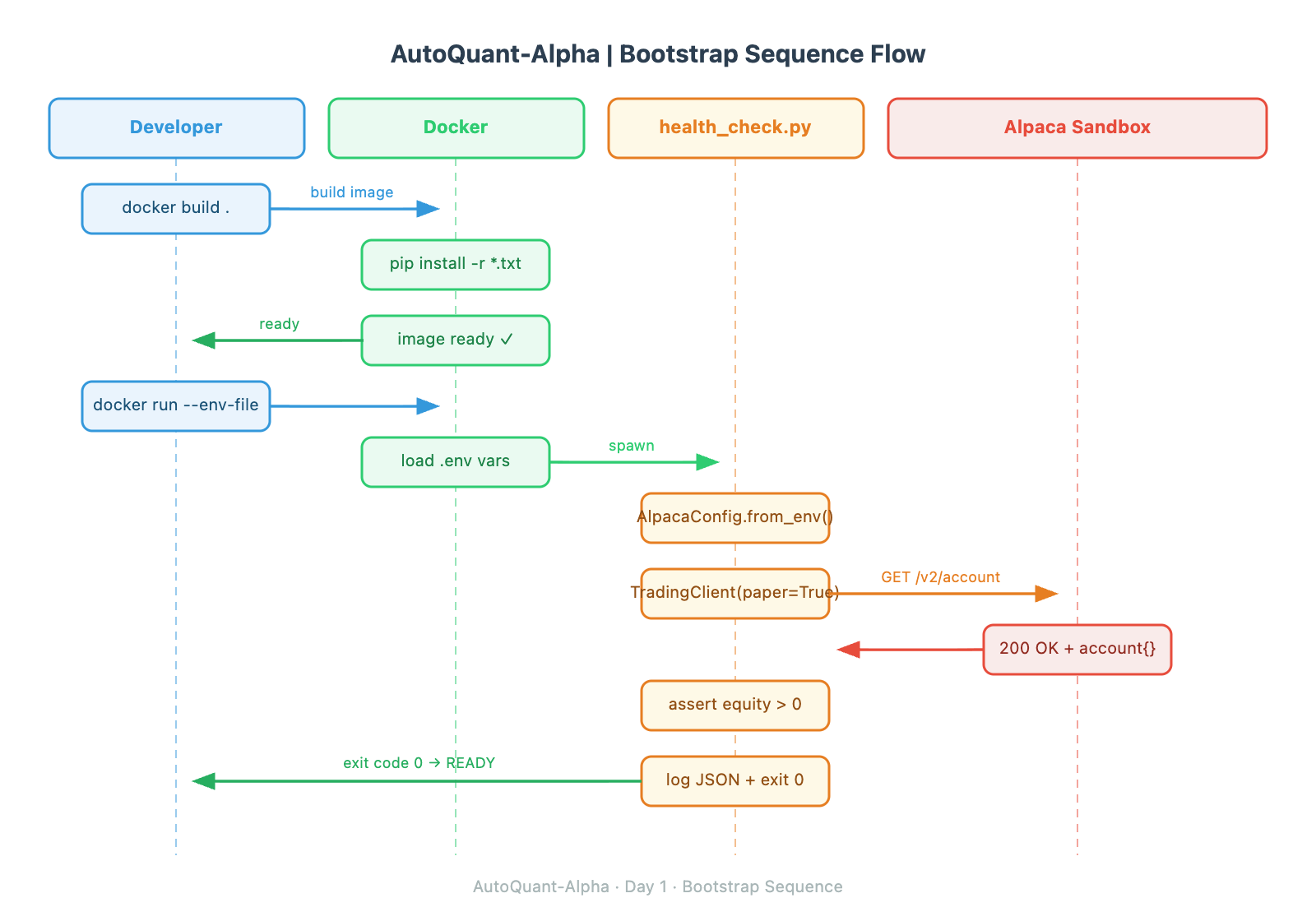
A health check is not a tutorial step. It’s a system primitive. Every service in a production trading system exposes a health check. Ours:
Loads credentials from environment (fails loudly if missing)
Instantiates the Alpaca REST client
Fetches account object
Asserts equity > 0
Logs structured success with latency in milliseconds
Exits with code 0 (success) or 1 (failure)
Exit codes matter because CI/CD pipelines and Docker health checks read them. A health check that prints “Error” but exits 0 is useless.
Production Readiness: Metrics to Watch on Day 1
Even on a setup day, we instrument from the start:
MetricWhat It Tells YouAcceptable ThresholdAuth Latency (ms)Network path to Alpaca< 200ms from your regionAccount Fetch Latency (ms)REST API baseline< 500msContainer Build Time (s)Dependency bloat< 60s cold buildImage Size (MB)Layer hygiene< 500MB
Log auth latency on every health check. Over time you’ll see if network conditions to Alpaca’s endpoints degrade — a signal that deserves investigation before it becomes a missed execution.
Github Source Code - Working code
https://github.com/sysdr/quantpython/tree/main/autoquant-alpha
Step-by-Step Guide
Prerequisites
Docker Desktop 4.x installed and running
VS Code with “Dev Containers” extension (
ms-vscode-remote.remote-containers)An Alpaca account with Paper Trading enabled (free at alpaca.markets)
Your Alpaca Paper Trading API Key ID and Secret Key (from the Alpaca dashboard → Paper Trading → API Keys)
Execution
# 1. Clone/create the workspace
python generate_workspace.py
cd autoquant-alpha

# 2. Configure credentials
cp .env.example .env
# Edit .env and paste your Paper Trading keys

# 3. Build and enter the container
docker build -t autoquant-alpha:day1 .
docker run --rm -it --env-file .env -v $(pwd):/workspace autoquant-alpha:day1 bash

# 4. Inside container — run health check
python src/health_check.py

# 5. Run the Rich CLI dashboard
python src/dashboard.py

# 6. Run test suite
python -m pytest tests/ -v

# 7. Cleanup
exit  # exits container
docker rmi autoquant-alpha:day1
Verification
Your terminal must show a JSON log line like:
{"ts": "2025-01-15 14:23:07,441", "level": "INFO", "msg": "Alpaca sandbox healthy | equity=100000.00 | latency_ms=143", "module": "health_check"}
And pytest must show all tests passing with 0 failures.
Homework: Production Challenge
Extend health_check.py to:
Accept a
--retriesCLI argument (useargparse, notsys.argvdirectly)On connection failure, implement exponential backoff: wait
2^attemptseconds before retryAfter all retries exhausted, exit with code 2 (distinguishing “unhealthy” from “error”)
Write a unit test that mocks the Alpaca client to return a 403 and verifies your script retries exactly N times and exits with code 2
This pattern — retry with backoff, structured exit codes, tested failure paths — appears in every production trading system component you will build in this course.