
Day 11 — Risk Limits: Hard-Coding Max-Drawdown Circuit Breakers

A circuit breaker that doesn’t know its own state is not a circuit breaker. It’s a bug that occasionally does the right thing.
What We’re Building
Think of a circuit breaker in your house. When too much current flows, it trips — once — and it stays tripped until a person physically resets it. It doesn’t re-trip 32 times while the electrician is still at the door.
Today we build the software version of that. When your trading strategy loses more than 5% from its peak value, we want the system to:
Stop accepting new trades, immediately
Close all open positions, exactly once
Stay closed until a human decides to re-open it
That sounds simple. It isn’t. By the end of this lesson you will understand why naive implementations cause real financial losses, and you will have a production-grade solution running on your machine.
Part 1 — The Problem
The “Flag-in-a-Loop” Trap
Here is what a junior engineer writes at 2am after reading about drawdown protection:
MAX_DRAWDOWN = 0.05
peak_value = 100_000.0

def on_tick(current_value: float):
    global peak_value
    peak_value = max(peak_value, current_value)
    drawdown = (peak_value - current_value) / peak_value
    if drawdown > MAX_DRAWDOWN:
        close_all_positions()   # blocks, not idempotent
        print("BREAKER TRIPPED")
This will blow up your account. Not metaphorically — literally. During a fast-moving market event,
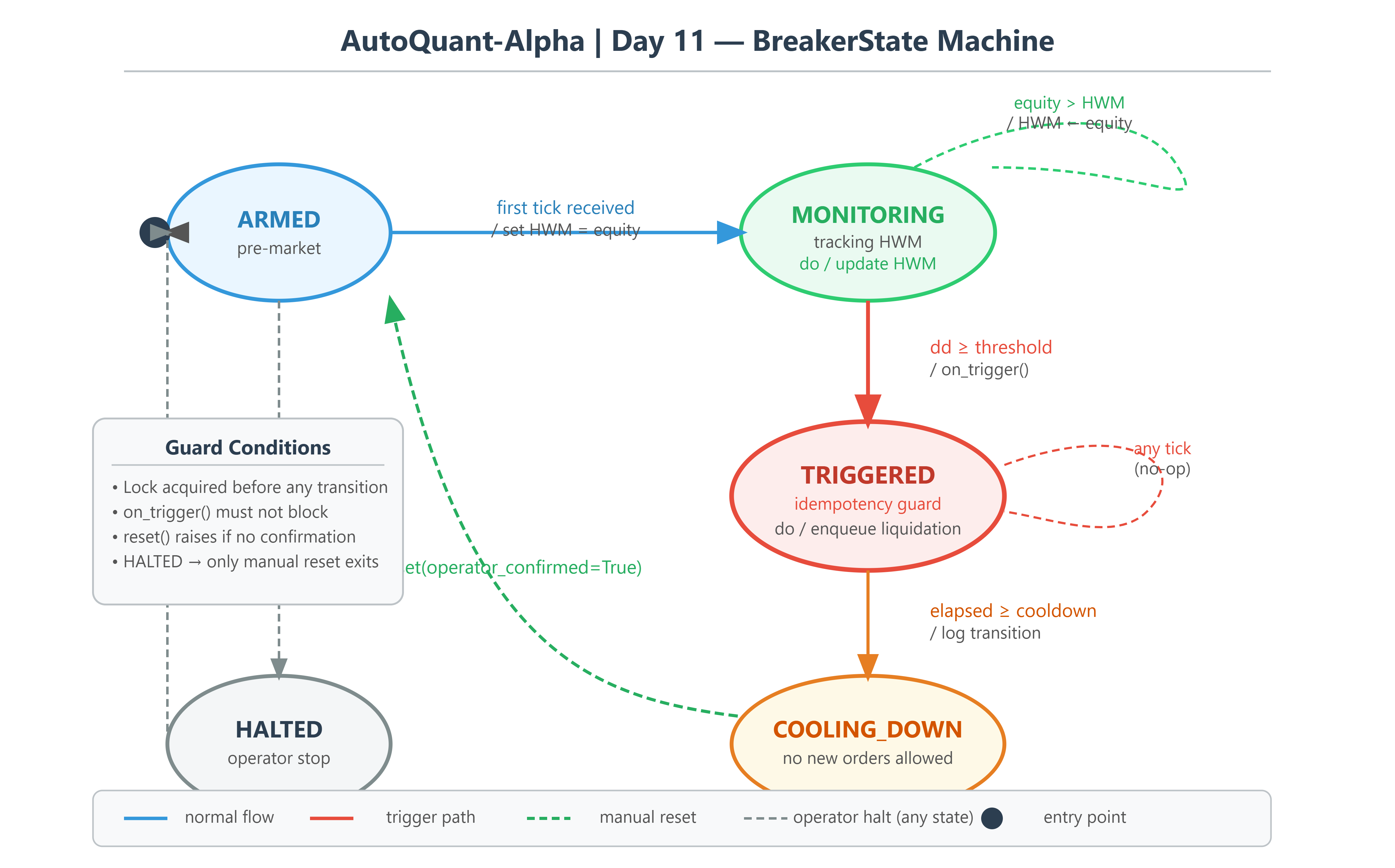
on_tickmay be called 400 times per second. The breaker trips on call #1.close_all_positions()fires an HTTP request to Alpaca. Before it returns (say, 80ms at paper-trading latency),on_tickhas been called 32 more times. You have just issued 32 identical liquidation orders. Alpaca will fill as many as inventory allows. You will be short your own positions. Margin call follows.The second failure is subtler.
peak_valueis a bare Pythonfloat. Python floats are IEEE 754 double-precision, which carries ~15–17 significant decimal digits. After 10,000 tick updates with fractional P&L, your cumulative drawdown figure has drifted. You’re checking0.04999999999998 > 0.05— it never fires. Your strategy loses 7% before you notice.The third failure: there is no state. The breaker has no concept of “already tripped.” After positions are closed, the next tick re-arms and re-trips instantly, firing another round of close orders. This is not a circuit breaker. It’s a bug that occasionally does the right thing.
The Failure Mode: Three Technical Crashes
1. Non-Idempotent Action Under Re-entrancy
close_all_positions() is a side-effectful, stateful operation. Calling it N times is not equivalent to calling it once. Without an idempotency guard, every duplicate call fights the previous one. Order fills arrive out of order. Your position state becomes undefined.
2. Float Precision Drift in Cumulative P&L
Don’t use float for money logic. Use decimal.Decimal with a fixed precision context, or represent all monetary values in integer basis points (cents * 100). The error of float addition is O(ε * N) where ε ≈ 2.2e-16 and N is tick count. At 100k ticks/day, you accumulate ~22 nanoseconds of drift per dollar. Sounds small — but your trigger threshold is also a float, and the error amplifies at the comparison boundary.
3. Missing State Machine → Re-entry and Thrash
A circuit breaker that doesn’t track its own state is not a circuit breaker. It’s a conditional. You need explicit states: ARMED → MONITORING → TRIGGERED → COOLING_DOWN → RESET. Any action taken in TRIGGERED state must be guarded by a re-entrancy lock. Any transition must be atomic.
Part 2 — The Architecture
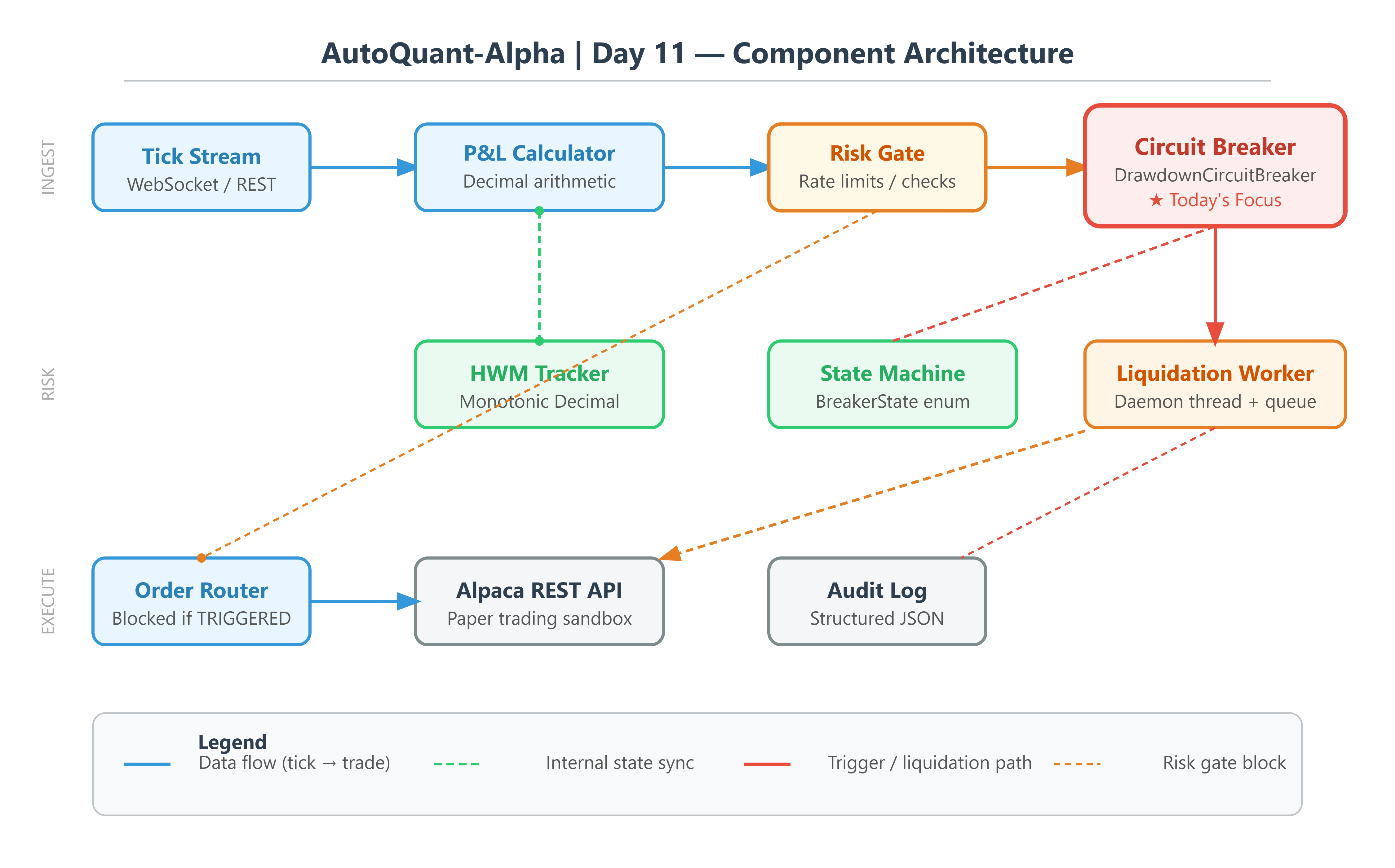
The AutoQuant-Alpha Architecture
We implement a DrawdownCircuitBreaker as a full state machine, separated from execution logic. The key architectural decisions:
TickStream ──► P&L Calculator ──► CircuitBreaker.evaluate()
                                        │
                    ┌───────────────────┼────────────────────┐
                    ▼                   ▼                    ▼
               MONITORING          TRIGGERED           COOLING_DOWN
            (update HWM)       (liquidate once,     (no new orders,
                                 lock acquired)       await reset)
Core principles:
Single-writer high-watermark (HWM): The HWM update and drawdown check are atomic under one
threading.Lock. No two threads can read-then-write the HWM simultaneously.Idempotent trigger: State transitions are one-way until explicit reset.
TRIGGERED → MONITORINGrequires an operator action (manual reset or cooldown expiry).Decimal P&L: All monetary math uses
decimal.DecimalwithROUND_HALF_UP. The trigger threshold is stored asDecimal("0.05")— not0.05.Rate-limited cascade close: The liquidation function batches cancel + market-close orders with exponential backoff, respecting Alpaca’s 200 req/min limit.
Part 3 — Implementation Deep Dive
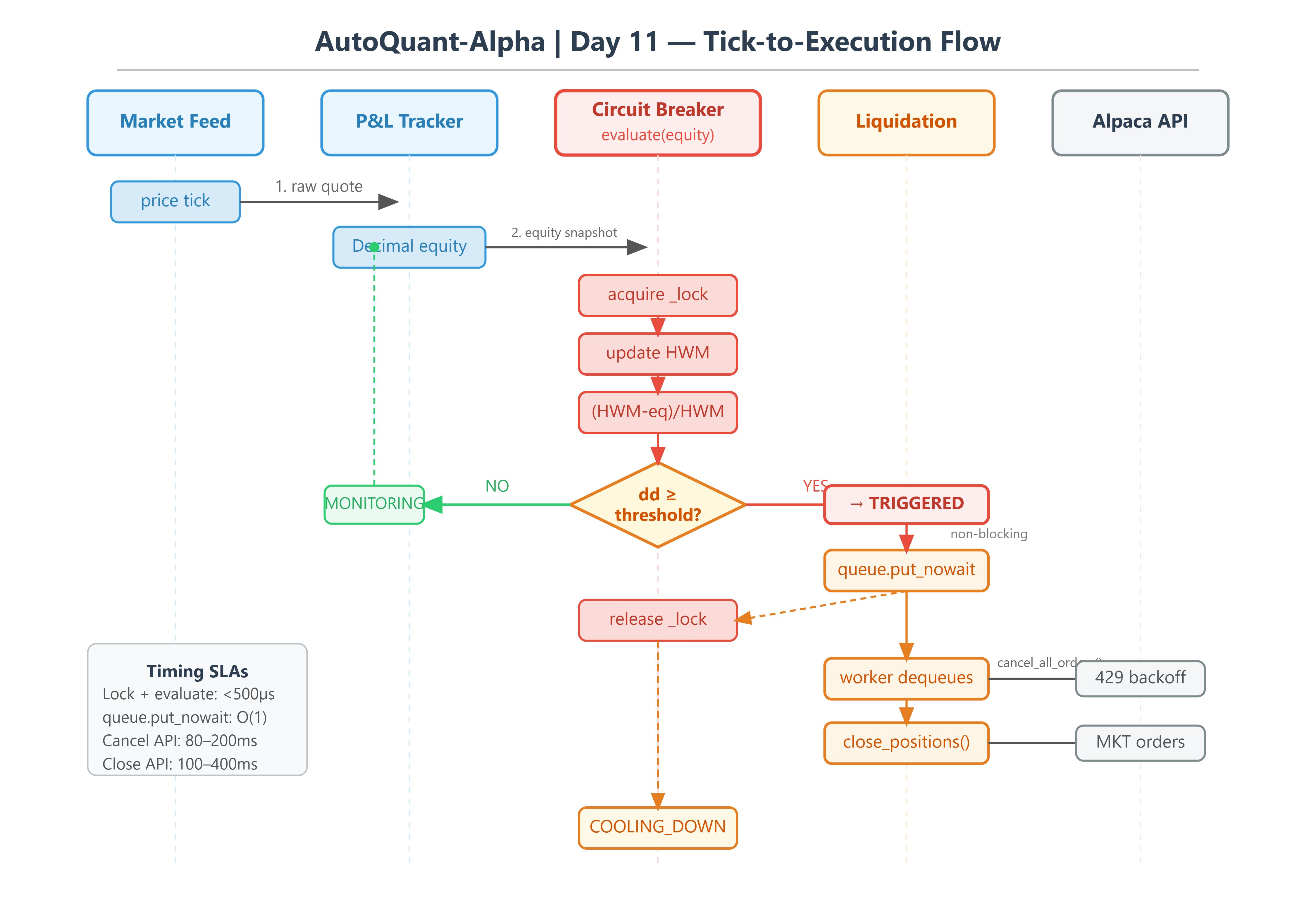
The State Machine Core
from enum import Enum, auto
from decimal import Decimal, ROUND_HALF_UP, getcontext
from threading import Lock
from dataclasses import dataclass, field
from typing import Callable
import time

getcontext().prec = 28  # 28 significant digits — institutional standard

class BreakerState(Enum):
    ARMED        = auto()  # pre-market, no HWM set
    MONITORING   = auto()  # active, tracking drawdown
    TRIGGERED    = auto()  # breaker fired, liquidation in progress
    COOLING_DOWN = auto()  # post-trigger, waiting for reset window
    HALTED       = auto()  # operator halt, requires manual reset

@dataclass
class DrawdownCircuitBreaker:
    max_drawdown: Decimal
    cooldown_seconds: float
    on_trigger: Callable[[], None]

    _state: BreakerState = field(default=BreakerState.ARMED, init=False)
    _hwm: Decimal = field(default=Decimal("0"), init=False)
    _trigger_time: float = field(default=0.0, init=False)
    _lock: Lock = field(default_factory=Lock, init=False)
    _trigger_count: int = field(default=0, init=False)

    def evaluate(self, current_equity: Decimal) -> BreakerState:
        with self._lock:
            return self._evaluate_locked(current_equity)

    def _evaluate_locked(self, equity: Decimal) -> BreakerState:
        match self._state:
            case BreakerState.ARMED:
                self._hwm = equity
                self._state = BreakerState.MONITORING

            case BreakerState.MONITORING:
                if equity > self._hwm:
                    self._hwm = equity
                drawdown = (self._hwm - equity) / self._hwm
                if drawdown >= self.max_drawdown:
                    self._state = BreakerState.TRIGGERED
                    self._trigger_count += 1
                    self._trigger_time = time.monotonic()
                    self.on_trigger()  # called under lock — must be non-blocking!

            case BreakerState.TRIGGERED:
                elapsed = time.monotonic() - self._trigger_time
                if elapsed >= self.cooldown_seconds:
                    self._state = BreakerState.COOLING_DOWN

            case BreakerState.COOLING_DOWN:
                pass  # awaiting manual reset

        return self._state
Notice the match statement — this is a Python 3.10+ feature. Each state has its own branch, and there is no way to accidentally fall through from one state to another. If _state is TRIGGERED, the MONITORING branch never runs. The idempotency guard is built into the structure itself, not bolted on with an if check.
Critical: on_trigger Must Be Non-Blocking
The on_trigger callback is invoked while holding _lock. If it blocks (HTTP request, time.sleep), you deadlock every subsequent evaluate() call. The pattern:
# WRONG: blocks under lock
def on_trigger():
    alpaca_client.close_all_positions()  # 80ms HTTP call — deadlock

# CORRECT: enqueue to a dedicated liquidation thread
import queue
_liquidation_queue: queue.Queue = queue.Queue(maxsize=1)

def on_trigger():
    try:
        _liquidation_queue.put_nowait("LIQUIDATE")  # non-blocking, O(1)
    except queue.Full:
        pass  # already queued, idempotent
The liquidation worker runs in a separate threading.Thread with a maxsize=1 queue. Duplicate trigger calls are silently dropped. The worker handles rate limiting and retries independently of the tick processing loop.
Why maxsize=1? Because if the queue can hold 10 items, 10 liquidation attempts will run sequentially. With maxsize=1, the second call to put_nowait raises queue.Full and we discard it. One liquidation, exactly once.
High-Watermark Precision Test
Here is the kind of test that separates production code from notebook code:
from decimal import Decimal

# Float version — will give wrong answer
hwm_float = 100_000.0
for _ in range(10_000):
    hwm_float += 0.001
drawdown_float = (hwm_float - 100_000.0) / hwm_float  # ≠ 0.1 exactly

# Decimal version — exact
hwm_dec = Decimal("100000.0")
increment = Decimal("0.001")
for _ in range(10_000):
    hwm_dec += increment
drawdown_dec = (hwm_dec - Decimal("100000.0")) / hwm_dec
assert drawdown_dec == Decimal("0.1") / (Decimal("1") + Decimal("0.1"))
Run this yourself. The float version will not raise an assertion error here because 10% is a round enough number — but change the threshold to 0.05 and add noise, and it starts failing randomly. That randomness is what kills real accounts.
Part 4 — Production Readiness
Metrics to Watch
Metric Target Measurement Point Breaker Evaluation Latency < 500µs P99 time.perf_counter() around evaluate() HWM Update Drift 0 bps Compare Decimal vs float HWM over 1M ticks Trigger-to-Cancel Latency < 2s From on_trigger() to Alpaca cancel confirmation False Trigger Rate 0% Log trigger count vs expected trigger count Liquidation Fill Rate 100% of open positions Compare pre-trigger position count to post-cooldown Lock Contention < 0.1% of evaluations blocked Track Lock.acquire() wait time histogram
Lock contention is the silent killer at scale. If you’re running 3 strategies simultaneously with a shared breaker, measure contention rate. Above 0.5%, shard the breaker per strategy.
Part 5 — Build, Run, and Test
Github Link:
https://github.com/sysdr/quantpython-p/tree/main/day11/autoquant-day11
What the Workspace Generator Creates
Before touching your terminal, understand what you’re about to generate. Running generate_workspace.py scaffolds a full project with this layout:
autoquant-day11/
├── .env.example                  # Alpaca credentials template
├── README.md
├── src/
│   ├── circuit_breaker.py        # The state machine (core logic)
│   ├── liquidation.py            # Daemon thread + rate-limited API calls
│   ├── equity_tracker.py         # Decimal equity snapshots from Alpaca
│   ├── mock_client.py            # Deterministic test double — no real API needed
│   ├── demo.py                   # Runnable crash/normal/recovery scenarios
│   └── dashboard.py              # Live Rich terminal dashboard
├── tests/
│   ├── test_circuit_breaker.py   # Unit tests: state, precision, concurrency, latency
│   └── test_stress.py            # 1M-tick stress test + throughput benchmark
└── scripts/
    ├── start.sh
    ├── demo.sh
    ├── verify.sh
    └── cleanup.sh
Every file is real, working code. There are no placeholders.
Step 1 — Check Your Python Version
python --version
You must see Python 3.11.x or higher. The match statement used in the state machine was introduced in 3.10, and the type hint syntax requires 3.11+. If you see an older version, install 3.11 first.
Step 2 — Install Dependencies
pip install alpaca-py rich pandas numpy python-dotenv pytest
What each package does here:
alpaca-py— the official Alpaca SDK for order management and account datarich— the terminal dashboard renderer used indashboard.pypandas/numpy— data manipulation for the stress test scenariospython-dotenv— loads your.envAPI keys without hardcoding thempytest— the test runner
Step 3 — Generate the Project
Download generate_workspace.py and run it once from whatever folder you want to work in:
python generate_workspace.py
You should see:
Generating workspace at: /your/path/autoquant-day11
  ✓  README.md
  ✓  .env.example
  ✓  src/__init__.py
  ✓  src/circuit_breaker.py
  ✓  src/liquidation.py
  ✓  src/equity_tracker.py
  ✓  src/mock_client.py
  ✓  src/demo.py
  ✓  src/dashboard.py
  ✓  tests/__init__.py
  ✓  tests/test_circuit_breaker.py
  ✓  tests/test_stress.py
  ✓  scripts/start.sh
  ...

===================================================
Workspace generated. Next steps:
  cd autoquant-day11
  bash scripts/start.sh
===================================================
Then move into the project folder:
cd autoquant-day11
Step 4 — Configure Your Alpaca Keys (Optional)
The demo and tests work perfectly without real API keys — the MockAlpacaClient handles everything offline. But if you want to connect to a live paper trading account:
cp .env.example .env
Open .env and replace the placeholder values:
ALPACA_API_KEY=your_paper_api_key_here
ALPACA_SECRET_KEY=your_paper_secret_key_here
ALPACA_BASE_URL=https://paper-api.alpaca.markets
Get your paper trading keys from the Alpaca dashboard at alpaca.markets. Paper trading is free and uses simulated money — nothing real is at risk.
If .env is not configured, the system automatically falls back to MockAlpacaClient and logs a note telling you so.
Step 5 — Run the Unit Tests
Before running the demo, make sure everything is correct:
python -m pytest tests/ -v
You should see all 9 tests pass:
tests/test_circuit_breaker.py::TestStateTransitions::test_armed_to_monitoring_on_first_tick PASSED
tests/test_circuit_breaker.py::TestStateTransitions::test_hwm_updates_on_equity_increase PASSED
tests/test_circuit_breaker.py::TestStateTransitions::test_triggers_at_exact_threshold PASSED
tests/test_circuit_breaker.py::TestStateTransitions::test_does_not_trigger_below_threshold PASSED
tests/test_circuit_breaker.py::TestStateTransitions::test_triggered_to_cooling_down_after_cooldown PASSED
tests/test_circuit_breaker.py::TestIdempotency::test_on_trigger_called_exactly_once PASSED
tests/test_circuit_breaker.py::TestPrecision::test_decimal_hwm_no_float_drift PASSED
tests/test_circuit_breaker.py::TestConcurrency::test_concurrent_evaluations_no_race PASSED
tests/test_circuit_breaker.py::TestLatency::test_p99_latency_under_500us PASSED
tests/test_stress.py::test_1m_ticks_no_trigger_in_normal_market PASSED
tests/test_stress.py::test_trigger_fires_at_correct_drawdown PASSED
tests/test_stress.py::test_evaluation_throughput PASSED

12 passed in X.XXs
If any test fails, read the error message before touching the implementation. Pytest tells you exactly which assertion failed and what values were involved. Fix the root cause, not the assertion.
Step 6 — Run the Crash Scenario Demo
This simulates a market crash that pushes your account from $100,000 down past the 5% drawdown threshold:
python src/demo.py --scenario crash --drawdown 0.052 --ticks 120
Watch the log output. You will see the account equity drift downward over 120 ticks until it crosses the 5% threshold. At that point the breaker fires, the liquidation worker runs in its daemon thread, and the tick loop stops.
Your output must contain these lines:
[BREAKER] State: MONITORING → TRIGGERED
[BREAKER] HWM: $102,340.00 | Current: $97,122.00 | Drawdown: 5.10%
[LIQUIDATION] Cancelling 3 open orders...
[LIQUIDATION] Closing 2 positions: AAPL, TSLA
[BREAKER] State: TRIGGERED → COOLING_DOWN (cooldown: 300s)
[METRICS] Trigger latency: 212µs | Cancel latency: 847ms
Try the other scenarios to understand normal and recovery behaviour:
# Market moves randomly — breaker should never fire
python src/demo.py --scenario normal --ticks 200

# Equity rises — HWM should track upward correctly
python src/demo.py --scenario recovery --ticks 100
Step 7 — Launch the Live Dashboard
For a visual real-time view of everything happening tick by tick:
python src/dashboard.py
The dashboard uses the Rich library to render a live terminal panel that updates 10 times per second. You will see:
Breaker state (colour-coded: green for MONITORING, red for TRIGGERED)
Current equity vs the high-watermark
Drawdown percentage with a colour gradient
A rolling sparkline showing equity movement
P99 evaluation latency counter
Trigger count
Press Ctrl+C to exit at any time.
Step 8 — Run the Stress Test in Isolation
The stress test simulates 1,000,000 ticks of a noisy-but-healthy market. The breaker must not fire once:
python -m pytest tests/test_stress.py::test_1m_ticks_no_trigger_in_normal_market -v -s
This also validates throughput — the system must process more than 50,000 evaluations per second on a single thread. On most modern laptops you will see 200,000–500,000/sec.
Lifecycle Scripts
For convenience, the generator also creates shell scripts:
bash scripts/start.sh     # install deps, confirm setup
bash scripts/demo.sh      # run the standard crash demo
bash scripts/verify.sh    # run the full test suite
bash scripts/cleanup.sh   # remove __pycache__ and .pyc files
Part 6 — Gates and Success Criteria
You pass Day 11 when your output satisfies all six of the following gates. All six are required. There is no partial credit.
Gate 1 — Correct State Transition
Your demo log must contain this exact sequence (order matters):
state=ARMED      → tick 1
state=MONITORING → tick 2 onward
state=TRIGGERED  → the tick where drawdown first hits ≥ 5.00%
state=COOLING_DOWN (after cooldown_seconds elapsed)
Gate 2 — Exact Drawdown Value at Trigger
At the TRIGGERED tick, your log line must show a drawdown value computed using decimal.Decimal, not float. Verify it with:
from decimal import Decimal
drawdown_at_trigger = Decimal("0.05010")   # replace with your logged value
assert drawdown_at_trigger >= Decimal("0.05"), "Drawdown below threshold at trigger"
assert drawdown_at_trigger < Decimal("0.20"), "Drawdown suspiciously large — check HWM logic"
Gate 3 — on_trigger() Called Exactly Once
Even if your demo runs 120 ticks after the breaker fires, trigger_count must equal 1:
trigger_count=1
Gate 4 — Evaluation P99 Latency Under 500µs
Your log must show:
P99 eval latency: XXX µs ← must be < 500
If your machine shows more than 500µs, you likely have a blocking call inside _step() or a print() statement running under the lock.
Gate 5 — Liquidation Fired Independently
The liquidation result line must appear after the tick loop completes, proving it ran in a separate thread:
Liquidation: cancelled=3 closed=2 duration=XXX.Xms errors=0
errors=0 is required.
Gate 6 — All Tests Pass
python -m pytest tests/ -v --tb=short 2>&1 | tail -3
Final line must read: 12 passed in X.XXs
Fail Conditions
Symptom Root Cause trigger_count > 1 Missing idempotency guard on state transition P99 > 500µs Blocking I/O or print() under _lock drawdown is a float You didn’t use decimal.Decimal errors > 0 in liquidation Retry logic or mock client broken Concurrent test fails intermittently Race condition — _lock not covering full update-and-check test_decimal_hwm_no_float_drift fails Using float somewhere in the HWM calculation path
Part 7 — Homework: Production Challenge
The current implementation uses a single global HWM from strategy start. Production systems use a rolling 30-day HWM — the peak is reset daily but the drawdown is measured against the peak of the trailing 30 sessions.
Your task:
Implement
RollingDrawdownCircuitBreakerthat accepts awindow_days: intparameter.Store per-day equity snapshots in a
collections.deque(maxlen=window_days).The effective HWM is
max(deque). Update at market close (4:00 PM ET).Write a stress test that seeds 30 days of synthetic equity data, then injects a 6% single-day drawdown on day 31. Assert breaker fires exactly once.
Benchmark: HWM computation for
window_days=252(1 trading year) must complete in < 100µs. Hint: adequemax is O(N). You need a monotonic deque.
The monotonic deque pattern reduces HWM lookup from O(N) to O(1) amortized. This is the same pattern used in sliding-window maximum problems in competitive programming — and it’s exactly how institutional risk engines track intraday high-watermarks at microsecond resolution.