
Day 30 — Market Execution: Coding the Slippage-Aware Market Order

You’ll build a production-grade order engine that captures the true cost of market execution, measures it on every fill, and raises an alert before that cost destroys your strategy’s edge.
The “Just Submit It” Trap
Here’s what a junior engineer writes on Day 1:
# naive_order.py — the version that gets you fired

client.submit_order(symbol="AAPL", qty=10, side="buy", type="market", time_in_force="day")
last_price = get_last_trade_price("AAPL")  # from yesterday's close
expected_pnl = (target_price - last_price) * qty
This runs. It fills. The backtest matches. You deploy it Friday afternoon, and by Monday your P&L attribution is corrupt. Not slightly off — structurally wrong.
The problem isn’t the order submission. It’s the assumption that
last_priceis a meaningful proxy for your actual fill. It isn’t. Your market order filled at the ask (for a buy). The last trade you fetched was the mid — or worse, yesterday’s close. That gap is slippage, and you’re not measuring it.At 10 orders/day this bleeds 2–3% annually in silent losses. At 100 orders/day, it’s a career-ending drag.
The Failure Mode: Spread Blindness
When you submit a market order, the exchange fills you at the best available ask (for buys) or best available bid (for sells). The spread between ask and mid is not a rounding error — it’s a structural cost baked into every single trade you place.
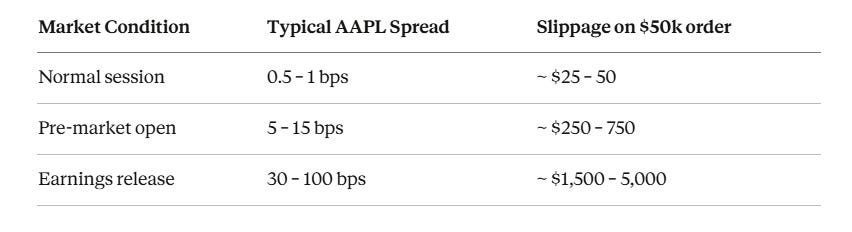
If your strategy targets 20 bps alpha per trade and you’re giving away 15 bps in untracked slippage, your real edge is 5 bps — and that disappears under transaction costs. The backtest showed 20 bps because it used mid-prices. The live system bleeds because market orders never fill at mid.
That’s failure one. There are two more.
Secondary failure: non-atomic logging. Two orders fill within the same millisecond. Both threads call
log_trade()simultaneously. Without a lock, you get interleaved writes — a single CSV row containing half of order A and half of order B. Your P&L reconciliation now requires manual repair.Tertiary failure: blocking on fill confirmation. Calling
time.sleep(2)while waiting for fill confirmation blocks your entire execution thread. During a volatility spike — the exact moment you need to act — your engine is frozen waiting for an order that already filled 1.8 seconds ago.
The AutoQuant-Alpha Architecture
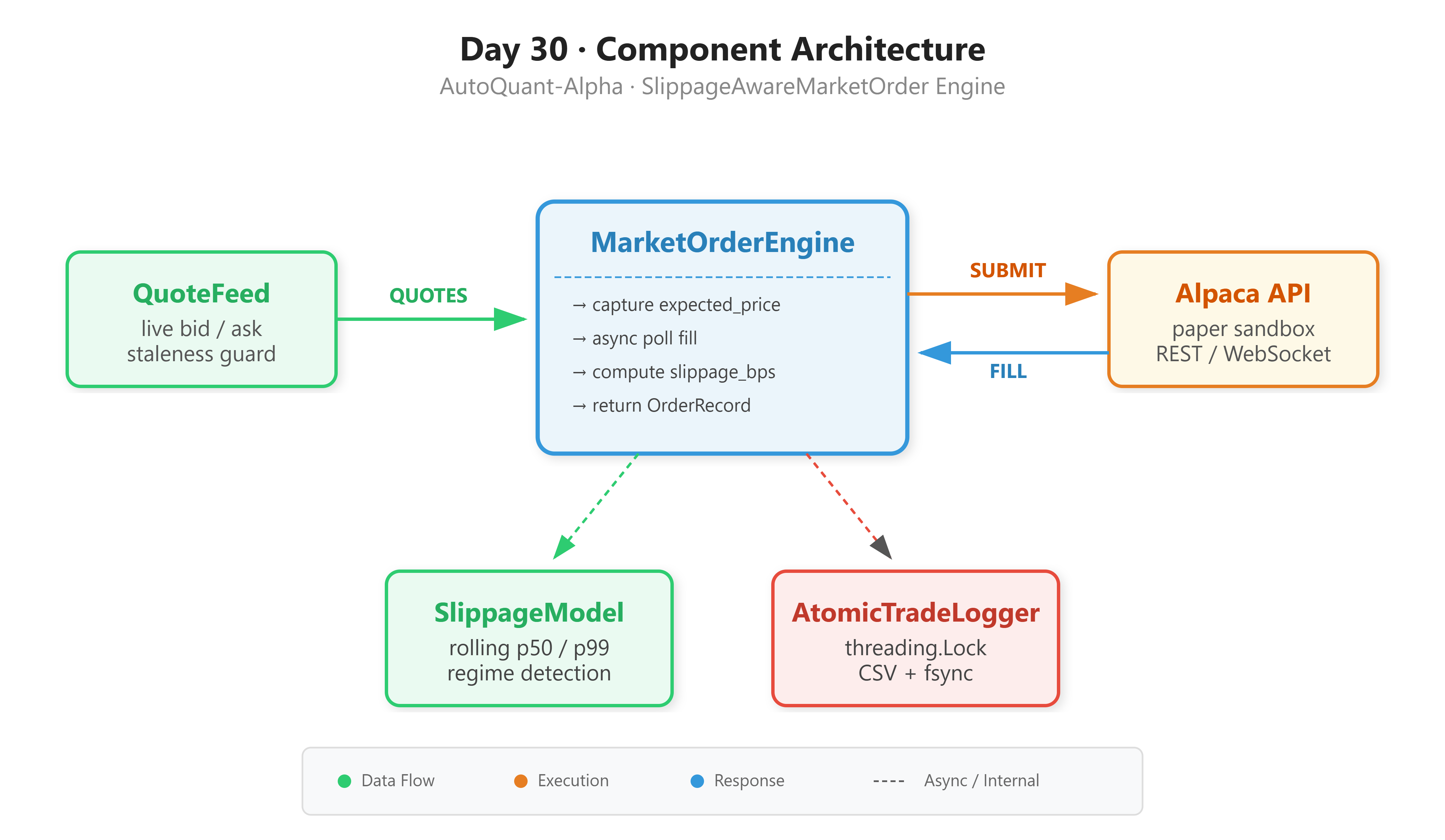
We replace the naive pattern with a four-component pipeline. Each component has one job. None of them bleed into each other’s responsibilities.
QuoteFeed fetches the live bid/ask at the exact moment you submit an order. This becomes your expected price baseline — ask for buys, bid for sells. It also enforces a staleness guard: if the quote is older than 500ms, it refuses to proceed.
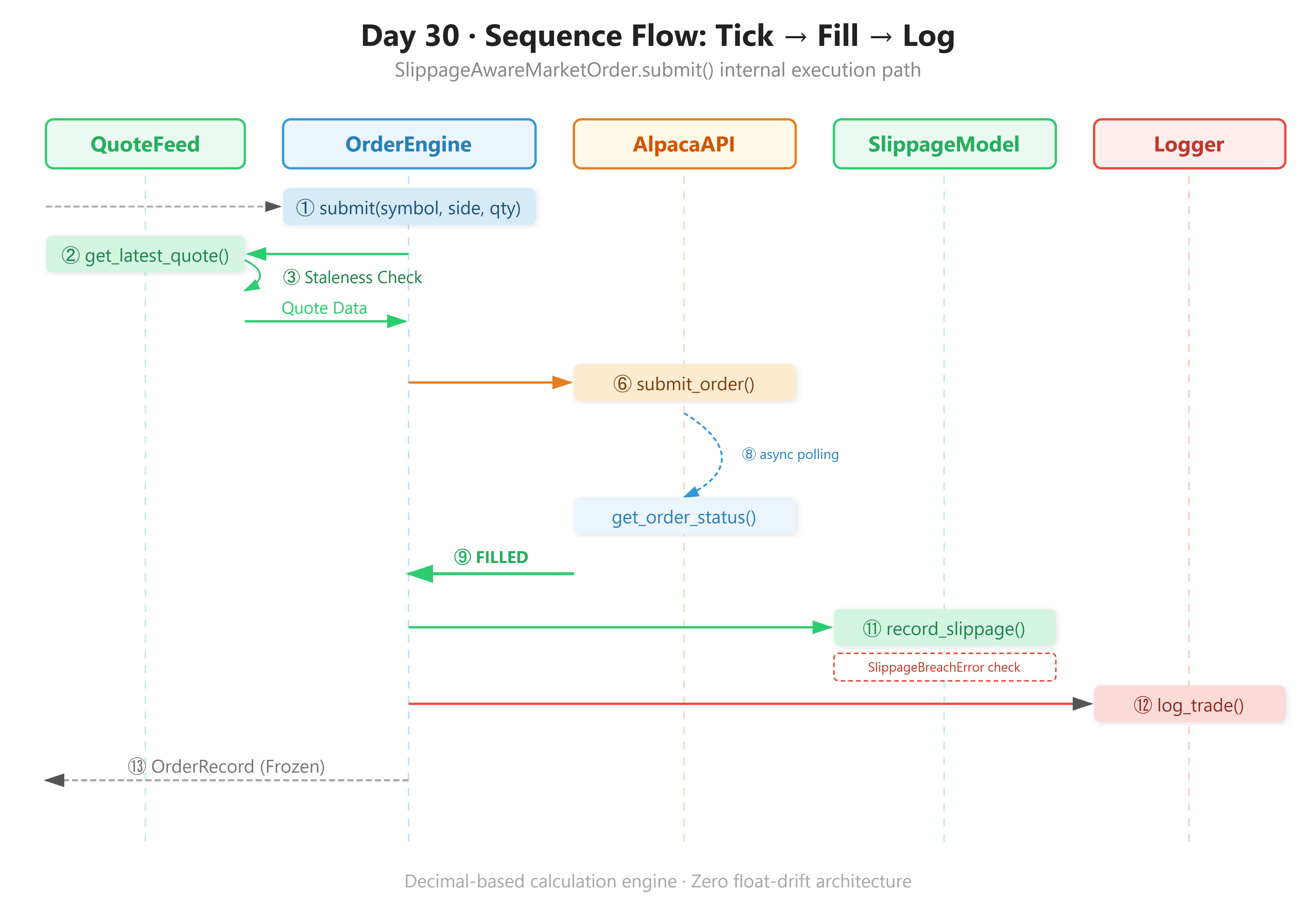
MarketOrderEngine is stateless. It takes a (symbol, side, qty) tuple, captures the quote, submits the order, waits for fill via async polling, then returns an OrderRecord dataclass. No hidden side effects except the atomic log write.
FillPoller uses asyncio with exponential backoff to check fill status without blocking the event loop. If no fill arrives within 30 seconds, it marks the order as TIMEOUT and raises an error.
SlippageModel maintains a rolling window of slippage observations and exposes p50_bps and p99_bps. If p99_bps exceeds your configured threshold, it raises SlippageBreachError before the next order is allowed through.
AtomicTradeLogger uses a threading.RLock around every CSV append, followed by an explicit os.fsync() call to force the kernel buffer to disk. One lock acquisition per write, held for microseconds. This is what makes simultaneous fills from multiple threads safe — you cannot corrupt what you cannot interleave.
Implementation Deep Dive
Why Decimal, Not Float
Never use float for price arithmetic in a trading system. Python floats are IEEE 754 double-precision — they cannot represent most decimal fractions exactly:
# src/execution/market_order.py

from decimal import Decimal, ROUND_HALF_UP

# WRONG: float precision error accumulates silently
slippage = (155.23000000000002 - 155.21) / 155.21 * 10000
# → 1.2884...bps  (not what the exchange actually charged you)

# RIGHT: Decimal with explicit precision and rounding mode
expected     = Decimal("155.21")
fill         = Decimal("155.23")
slippage_bps = ((fill - expected) / expected * Decimal("10000")).quantize(
    Decimal("0.01"), rounding=ROUND_HALF_UP
)
# → Decimal("1.29")  — exact, deterministic, closes to the cent
After 500 trades, float accumulation drift can misstate your realized P&L by $200–400. Decimal is roughly 3x slower per operation, but your P&L reconciliation closes to the cent every time.
OrderRecord as a Frozen Dataclass
The frozen=True parameter on a dataclass does two things: it makes the object hashable (you can put it in a set or use it as a dict key), and it prevents mutation after construction. That second property is critical when passing records across threads — you cannot corrupt an object that cannot change.
# src/execution/market_order.py — the value object

from dataclasses import dataclass
from decimal    import Decimal
from datetime   import datetime

@dataclass(frozen=True)
class OrderRecord:
    symbol:         str
    side:           str             # "buy" | "sell"
    qty:            int
    expected_price: Decimal         # bid or ask at submission time
    submitted_at:   datetime
    order_id:       str
    fill_price:     Decimal | None  # filled_avg_price from Alpaca
    filled_at:      datetime | None
    slippage_bps:   Decimal | None  # (fill - expected) / expected * 10000
    status:         str             # FILLED | REJECTED | TIMEOUT

    @property
    def net_slippage_cost(self) -> Decimal | None:
        """Total dollar cost of slippage for this order."""
        if self.slippage_bps is None:
            return None
        return (
            (self.slippage_bps / Decimal("10000"))
            * self.expected_price
            * Decimal(str(self.qty))
        ).quantize(Decimal("0.01"), rounding=ROUND_HALF_UP)
The X | None union syntax is Python 3.10+. We’re on 3.11, so use it freely — it reads much cleaner than Optional[X].
Async Fill Polling Without Blocking the Event Loop
The core insight: calling time.sleep() in a synchronous fill-wait loop is a thread blocker. If you’re running multiple strategies on the same process, one slow fill starves everything else. We use asyncio instead — the event loop yields control back during every await asyncio.sleep() call.
# src/execution/market_order.py — the poller

async def _poll_fill(self, order_id: str) -> Order:
    backoff = 0.1  # start at 100ms
    try:
        async with asyncio.timeout(self._fill_timeout_s):  # Python 3.11
            while True:
                order = self._client.get_order_by_id(order_id)
                match order.status:
                    case OrderStatus.FILLED | OrderStatus.PARTIALLY_FILLED:
                        return order
                    case OrderStatus.REJECTED | OrderStatus.CANCELLED:
                        raise OrderRejectedError(
                            f"Order {order_id} terminal: {order.status}"
                        )
                    case _:
                        await asyncio.sleep(backoff)
                        backoff = min(backoff * 1.5, 2.0)  # cap at 2s
    except TimeoutError:
        raise OrderTimeoutError(
            f"Order {order_id} not filled in {self._fill_timeout_s}s"
        )
The backoff starts at 100ms and multiplies by 1.5 each loop, capping at 2 seconds. A fast fill on a liquid stock might resolve in the first or second poll. A fill delay during congestion will gradually slow its polling instead of hammering the API rate limit. asyncio.timeout() is the Python 3.11 way to add a hard deadline to any coroutine — cleaner than the old asyncio.wait_for() pattern.
The match/case block gives us exhaustive status dispatch. The fallthrough case _ catches any intermediate state like ACCEPTED or NEW and keeps polling.
Building and Running the Project
Github Link:
https://github.com/sysdr/quantpython/tree/main/day30/autoquant-day30
Project Structure
The workspace generator (generate_workspace.py) creates this layout in one shot:
autoquant-day30/
├── src/
│   ├── execution/
│   │   ├── market_order.py      # SlippageAwareMarketOrder + OrderRecord
│   │   └── slippage_model.py   # SlippageModel, regime detection, SlippageBreachError
│   ├── data/
│   │   └── quote_feed.py        # QuoteFeed — live bid/ask with staleness guard
│   └── utils/
│       └── logger.py            # AtomicTradeLogger — threading.RLock + fsync
├── tests/
│   ├── test_slippage_model.py   # 8 unit tests incl. Decimal precision regression
│   └── stress_test.py           # 10 threads × 100 concurrent writes
├── scripts/
│   ├── demo.py                  # Rich CLI dashboard, live paper trading
│   ├── verify.py                # 5-gate success criterion checker
│   ├── start.sh                 # install + test runner
│   └── cleanup.sh               # wipe generated data + __pycache__
├── data/
│   └── trade_log.csv            # written at runtime
├── .env.example
├── requirements.txt
└── conftest.py
Prerequisites
Before you run anything, confirm your Python version. This code uses asyncio.timeout() and match/case, both of which require 3.11 minimum:
python --version # must print Python 3.11.x or higher
You also need an Alpaca account set up for paper trading. Sign up at alpaca.markets, navigate to Paper Trading, and copy your API key and secret key. They’re free and you will never touch real money.
Step 1 — Generate the workspace
Run the generator script from whatever directory you want to work in. It creates the full autoquant-day30/ tree with all source files written out:
python generate_workspace.py
Step 2 — Enter the project and configure your API keys
cd autoquant-day30
cp .env.example .env
Open .env in any text editor and fill in your Alpaca paper trading credentials:
ALPACA_API_KEY=your_paper_api_key_here
ALPACA_SECRET_KEY=your_paper_secret_key_here
ALPACA_BASE_URL=https://paper-api.alpaca.markets
SLIPPAGE_ALERT_BPS=15.0
ORDER_FILL_TIMEOUT_S=30.0
Step 3 — Install dependencies
pip install -r requirements.txt
This installs alpaca-py, rich, numpy, pandas, python-dotenv, and pytest, all pinned to minimum versions that are known to work together.
Step 4 — Run the unit test suite
Eight tests cover the slippage model — regime detection, percentile math, breach alerts, and the Decimal precision regression that catches float drift:
pytest tests/test_slippage_model.py -v
All eight should pass before you touch the live API. If any fail, your environment has a version conflict — check your pip list.
Step 5 — Run the concurrent write stress test
This spawns 10 threads and has each one write 100 trade records simultaneously. It then reads the CSV back and verifies no rows were corrupted or interleaved:
python tests/stress_test.py
Expected output:
Stress test: 10 threads × 100 records = 1000 writes
  ✓ 1000 rows written in 0.312s (3205 rows/s)
  ✓ No row corruption detected
Step 6 — Launch the live demo against paper trading
This submits a real market order through Alpaca’s paper sandbox, polls for fill, computes slippage, and displays a live Rich dashboard in your terminal. Run this during US market hours (9:30 AM – 4:00 PM ET) for immediate fills on liquid names like AAPL or SPY:
python scripts/demo.py --symbol AAPL --qty 5 --side buy
You’ll see a two-panel display: the live quote at the moment of submission, then the completed order record with slippage annotated in green (under 3 bps), yellow (3–8 bps), or red (over 8 bps).
Note on market hours: If you run outside market hours, Alpaca will queue the order as a Day order and it will either fill at open or expire. The fill poller will timeout after 30 seconds and write a
TIMEOUTstatus to your log — that is expected behavior, not a bug.
Step 7 — Verify your fill log
The verifier reads data/trade_log.csv and checks five conditions. It exits with code 0 on success and prints a detailed pass/fail report:
python scripts/verify.py
Step 8 — Clean up when you’re done
bash scripts/cleanup.sh
Deletes data/trade_log.csv and clears all __pycache__ directories. Safe to run between demo sessions.
Production Readiness: What to Measure
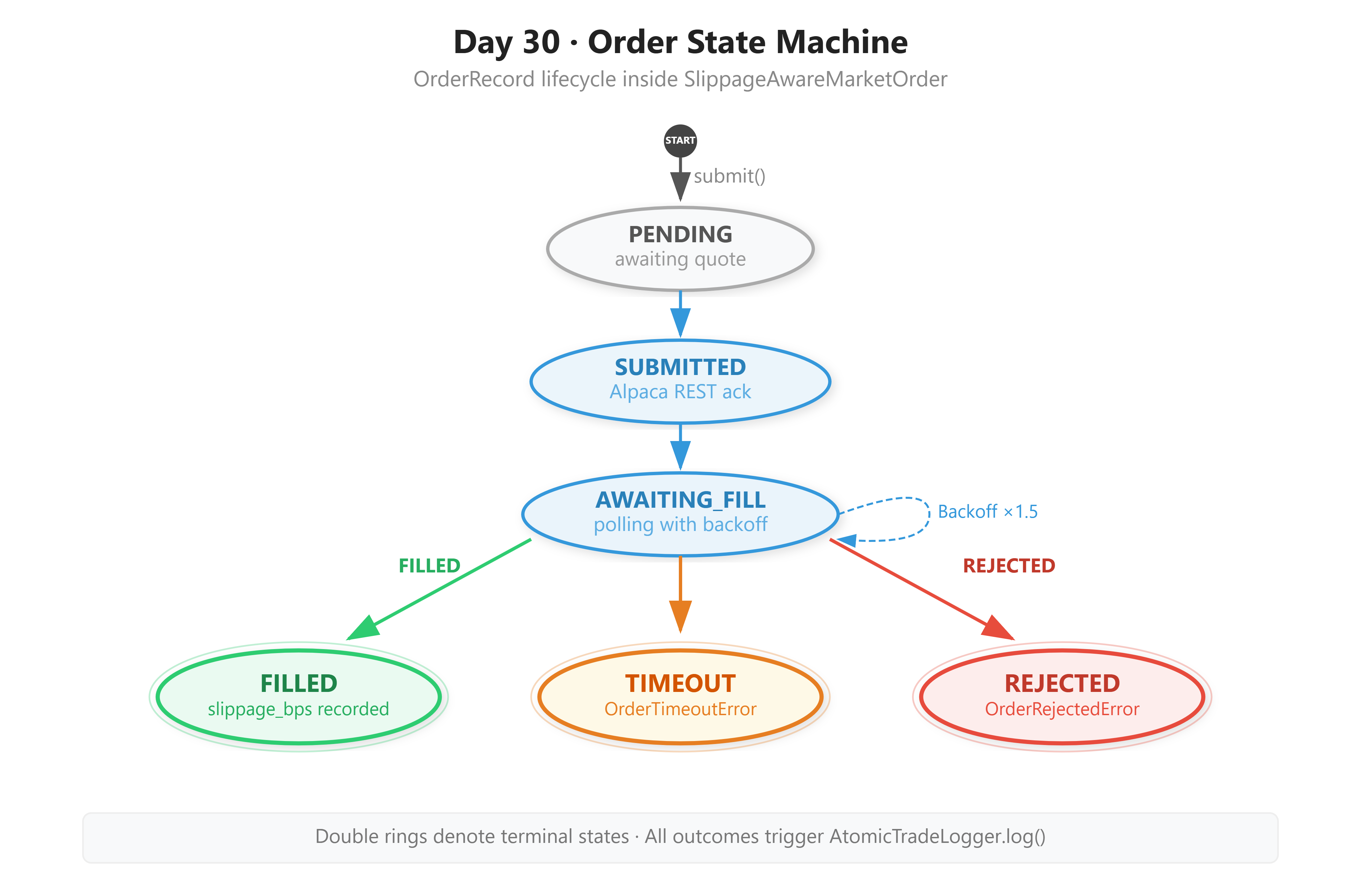
Shipping code that works once is the beginning, not the end. These are the five metrics you instrument from Day 1. Each one has a threshold — exceed it, and something real has gone wrong.
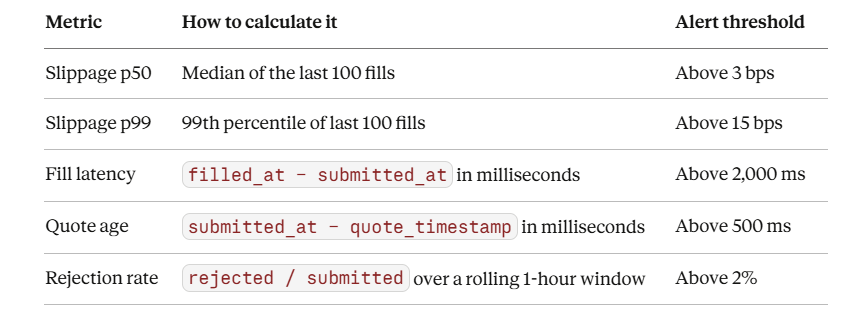
Track these per-symbol and per-session. AAPL during the open bell has different slippage characteristics than SPY during the 3:45 PM liquidity surge. A single flat threshold applied to every symbol in your universe will either trigger constant false alerts on illiquid names or completely miss real problems in high-volume ones.
On a liquid mega-cap (AAPL, MSFT, SPY) during regular session with a 100-share market order, you should see p50 slippage under 1.5 bps and fill latency under 400 ms. If you’re regularly seeing 8+ bps on SPY, something is wrong upstream — check your quote feed latency and whether you’re hitting Alpaca’s rate limits.
Day 30 Success Criterion
Run both commands and confirm all five checks pass:
python scripts/demo.py --symbol AAPL --qty 5 --side buy
python scripts/verify.py
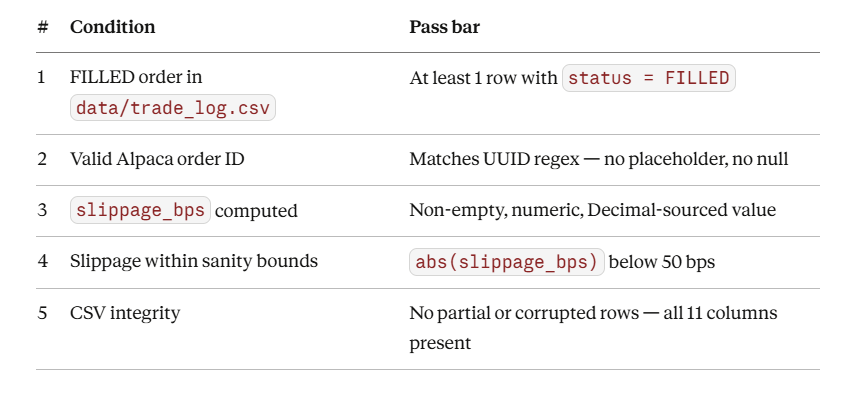
Hard criterion: Your log must show a confirmed Alpaca order_id (UUID format) with a computed slippage_bps value. For paper trading during regular market hours, slippage on a liquid ETF (SPY, QQQ) or mega-cap equity (AAPL, MSFT) should be below 5 bps. Values between 5 and 15 bps indicate elevated spread conditions — note the time and market condition. Values above 15 bps must trigger a SlippageBreachError per your configured threshold. If they don’t, your SLIPPAGE_ALERT_BPS value in .env is too high.
For cohort review: Paste the last 5 lines of data/trade_log.csv showing order_id, slippage_bps, status, fill_price, and net_slippage_cost. Annotate which market session (pre-market, regular, post-market) produced the result, and which SlippageModel regime was active: NORMAL, ELEVATED, or HIGH.
Homework: The Production Challenge
Extend SlippageModel with a regime detector.
Calculate a 20-trade rolling average of abs(slippage_bps). If that rolling average exceeds HIGH_SLIPPAGE_REGIME_THRESHOLD = 8.0 bps, your engine must automatically switch to limit orders (with a configurable aggression offset) instead of market orders.
Log every regime transition with a timestamp. Your test run must show at least one REGIME_CHANGE: market → limit event in the output.
This is Day 31’s foundation. The SlippageModel you built today is the exact input your limit order engine will read to decide its aggression level. Do not skip this.