
Day 40 — Fill Timestamps Are Lies
(Until You Engineer Them Not To Be)

Think about what happens the moment you click “buy” on a stock. Between you pressing that button and the trade actually executing on an exchange, a small cascade of events fires off — your app sends a request, the broker checks your account, the exchange matches your order against another trader’s order, and then a confirmation message bounces back to you. Each of those steps takes real time.
Now imagine you’re building a program that does this automatically, hundreds of times a day. Suddenly, measuring when exactly each of those events happened isn’t just bookkeeping — it’s the difference between having accurate data and making decisions based on lies.
That’s what today is about.
The “Single Timestamp” Trap
Every developer hits this exact mistake the first time they build a live order feed. They subscribe to TradingStream, intercept the fill event, and write this:
# THE TRAP — do not do this
order["filled_at"] = datetime.now()
order["latency_ms"] = (order["filled_at"] - order["submitted_at"]).total_seconds() * 1000
Looks reasonable, right? Record the time when the fill arrived, subtract the time we sent the order, call it latency. Two lines. Done.
Except there are three silent killers hiding in those two lines.
datetime.now() has no timezone. Python’s datetime.now() creates a “naive” datetime — it doesn’t know whether it’s UTC, EST, or your local timezone. The moment you try to compare it against Alpaca’s data.timestamp, which is timezone-aware UTC, Python throws:
TypeError: can't subtract offset-naive and offset-aware datetimes
On a quiet afternoon this crash is easy to spot. During a volatility spike, your exception handler might silently swallow it and keep going — leaving filled_at = None on every order forever, invisibly, while you think everything is fine.
You’re measuring the wrong thing. datetime.now() fires when your code runs, not when the exchange filled the order. Those two moments are separated by broker processing time, TLS encryption overhead, WebSocket frame buffering, and Python event loop scheduling lag. During a busy market that gap is easily 50–300ms. Your “latency” metric is not measuring what you think it’s measuring.
You’ve mixed two completely different measurements. Broker fill latency (how long the exchange took to execute your trade) and network latency (how long the event took to travel from their server to yours) are fundamentally different signals. One tells you about market microstructure — is the exchange slow today? The other tells you about your infrastructure — is your connection degraded? Smashing them together destroys both.
The path to account damage is subtle here. You build a fill quality analyser on these corrupted timestamps. It tells you your limit orders are being filled slower than market orders. They aren’t — your limit handler just has higher scheduling lag. You switch strategies based on that “insight”. You bleed alpha for months while your own data keeps validating the wrong decision.
The Failure Mode at Scale
Now add concurrency to the picture. Real execution engines don’t trade one stock at a time — they process multiple symbols simultaneously.
Under Python’s asyncio, two coroutines can interleave on a single thread:
# RACE CONDITION — partial fill on SPY and AAPL arrive simultaneously
async def on_fill(data):
    order = orders[data.order_id]          # both coroutines read stale state
    order["filled_qty"] += float(data.qty) # both increment from the same baseline
    order["avg_px"] = recalculate_vwap(order)  # one overwrites the other's work
Here’s the trap that catches even experienced developers: Python’s GIL (Global Interpreter Lock) does not protect you here. The GIL prevents true parallelism across CPU threads, but asyncio is different — it’s cooperative multitasking on a single thread. A coroutine yields control at every await. The lines between await calls are not atomic.
So here’s what actually happens. Both tasks read filled_qty = 50. Both add 25. Both write 75. Total filled quantity should be 100. You’ve got 75. A fill has been silently erased from your records.
At 10 orders per second, this is a live account ruin scenario — not a theoretical edge case.
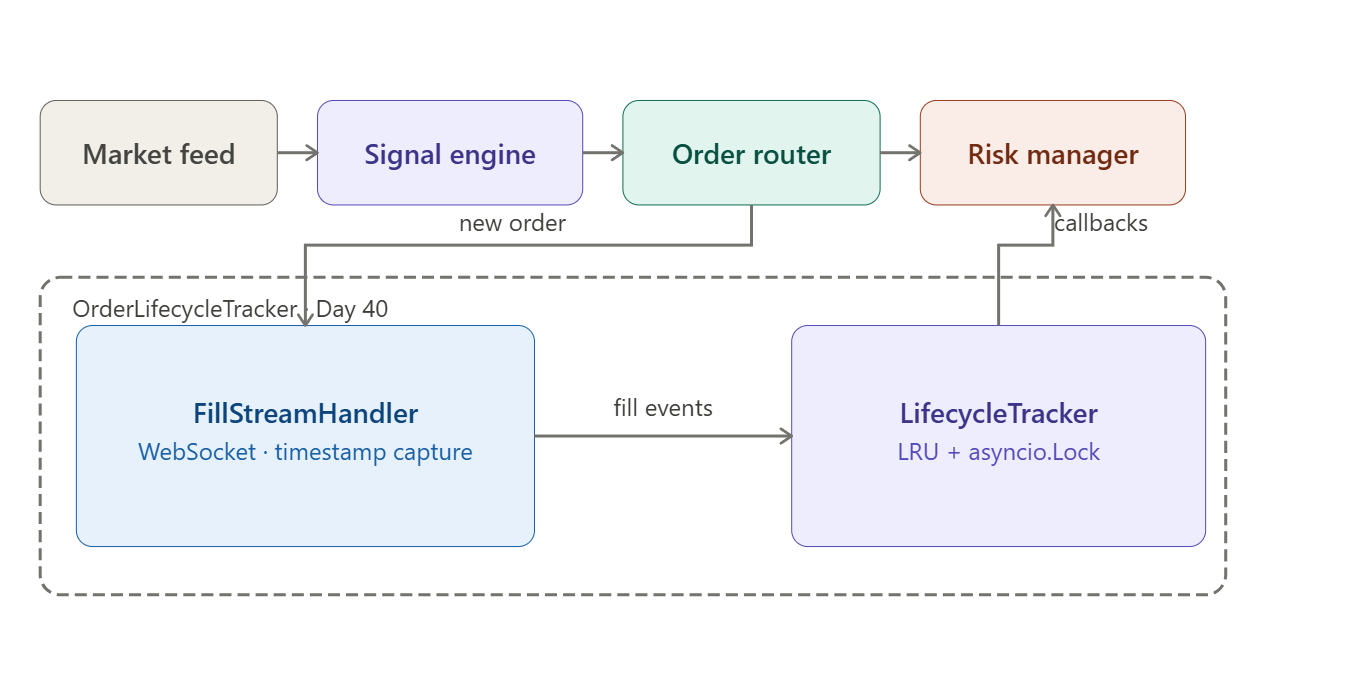
The AutoQuant-Alpha Architecture
Instead of patching the broken approach, we rebuild from four clean separations. Think of each separation as drawing a clear line between things that feel similar but are actually completely different.
Separation 1 — Broker time vs local time, always captured as separate fields.
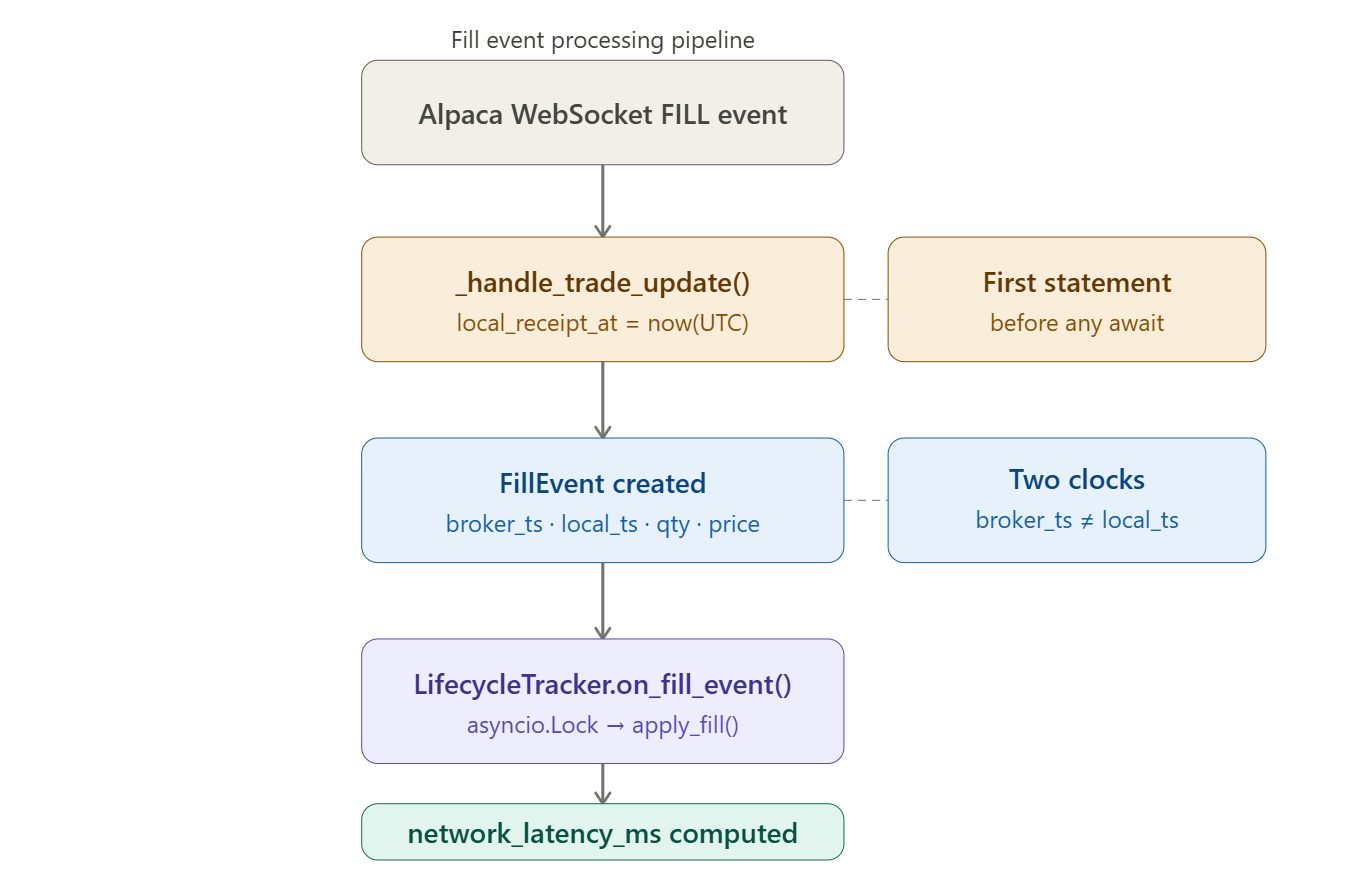
Every FillEvent carries two timestamps: broker_timestamp (pulled from Alpaca’s data.timestamp, which is the server’s UTC time of the event) and local_receipt_at (captured as the absolute first statement in the handler, before any await, before any attribute access, before anything else).
This one rule — capture local time first — eliminates scheduling noise from your network latency measurement. Every microsecond your handler spends doing other work before reading datetime.now() inflates the number. Make it first, make it honest.
Separation 2 — A timestamp chain, not a single field.
OrderLifecycle tracks the full chain:
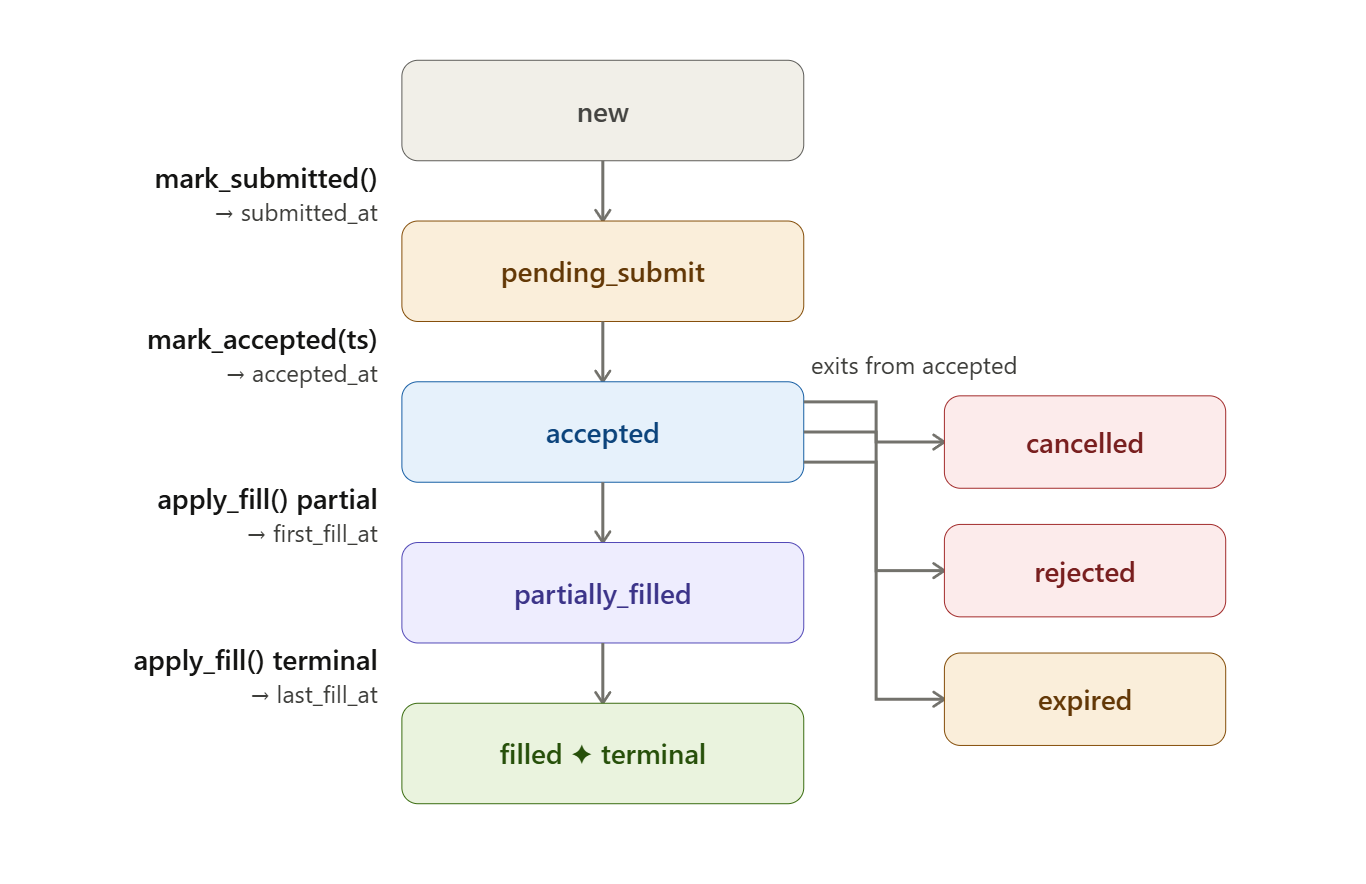
created_at → submitted_at → accepted_at → first_fill_at → last_fill_at
With local receipt counterparts for the fill endpoints. Each field answers a distinct question about the order’s history. submitted_at tells you when you sent it. accepted_at tells you when the broker acknowledged it. first_fill_at tells you when trading actually began. A single filled_at field cannot tell you any of those things individually.
Separation 3 — State transitions are methods, not field assignments.
mark_submitted(), mark_accepted(broker_ts), and apply_fill(fill) encapsulate mutation, compute derived metrics atomically, and enforce valid transitions. If you try to apply a fill to an order already in FILLED state, you get a ValueError immediately. The state machine cannot be put into an illegal combination by accident.
Separation 4 — Concurrency via asyncio.Lock, not shared mutable state.
LifecycleTracker wraps an OrderedDict behind a single asyncio.Lock. All mutations are serialized — only one coroutine can modify order state at a time. Callbacks fire outside the lock, which prevents deadlocks if a callback tries to re-enter the tracker. The OrderedDict gives us O(1) LRU eviction through move_to_end() and popitem(last=False) — no cache library needed.
Implementation Deep Dive
Github Link:
https://github.com/sysdr/quantpython/tree/main/day40/autoquant-alpha-day40
__slots__ on Dataclasses
@dataclass(slots=True)
class FillEvent:
    fill_id: str
    qty: float
    price: float
    broker_timestamp: datetime
    local_receipt_at: datetime
The slots=True argument (Python 3.10+) tells Python not to create a __dict__ for each instance. Normally every Python object carries a dictionary to store its attributes — that dictionary has overhead. With slots, attributes are stored in a fixed, pre-allocated structure instead. Memory drops from roughly 400 bytes per object to roughly 160 bytes. At 50,000 fills in a session that saves about 12 MB — not earth-shattering, but this is exactly the kind of decision that separates a system that runs fine at low volume from one that degrades under pressure.
Numerically Stable VWAP
VWAP (Volume-Weighted Average Price) is how you calculate the true average price you paid across multiple partial fills. The formula is straightforward:
VWAP = ((old_filled_qty × old_avg_price) + (new_qty × new_price)) / total_filled_qty
The problem is floating-point drift. Computers store decimal numbers in binary, which means some numbers can’t be represented exactly. Repeatedly adding tiny quantities compounds the error. After enough micro-fills, filled_qty might compute to 0.9999999999999998 instead of 1.0. Without a guard, the equality check filled_qty == qty fails, and the order never transitions to FILLED — it hangs in PARTIALLY_FILLED forever:
if self.filled_qty >= self.qty - 1e-9:   # float epsilon guard
    self.state = OrderState.FILLED
That 1e-9 (one billionth) tolerance catches the floating-point residual without being so large that it masks real discrepancies.
LRU Eviction Without a Cache Library
A trading session can generate thousands of orders. You can’t keep every order in memory indefinitely — you need a way to automatically discard the oldest ones when you hit a size limit. The standard solution is an LRU (Least Recently Used) cache: when full, evict the order that was accessed least recently.
Python’s built-in OrderedDict gives you this for free:
async def on_fill_event(self, order_id: str, fill: FillEvent):
    async with self._lock:
        lc = self._orders.get(order_id)
        lc.apply_fill(fill)
        self._orders.move_to_end(order_id)  # refresh LRU position
move_to_end(key) bumps the key to the tail (most-recently-used position) in O(1) time. popitem(last=False) evicts from the head (least-recently-used position) in O(1) time. No external library. No complexity. The data structure does the work.
Latency Metrics Computed Once, at Terminal State
_compute_terminal_latencies() fires only when state == FILLED. This is deliberate. You don’t want to recompute three latency metrics on every single partial fill — that’s wasted work and it means intermediate values could leak into dashboards. By computing once at the terminal state, downstream consumers (risk manager, reporting dashboard) read pre-computed floats with no recalculation needed.
Project Setup
What You Need
Python 3.11 or newer — check with
python --versionAn Alpaca paper trading account (free at alpaca.markets)
About 10 minutes
Install Dependencies
pip install alpaca-py rich pytest pytest-asyncio
Get Your Paper Trading Credentials
Log in to Alpaca, navigate to Paper Trading, and generate an API key pair. Then set them as environment variables:
export ALPACA_KEY="your_paper_key"
export ALPACA_SECRET="your_paper_secret"
If you skip this step, the demo will run in offline simulation mode — which is perfectly fine for learning the lifecycle mechanics.
Generate the Workspace
python generate_workspace.py
cd autoquant-alpha-day40
Running generate_workspace.py creates the entire project structure in one shot. Here is what gets created:
autoquant-alpha-day40/
├── src/
│   ├── models/
│   │   └── order_lifecycle.py      # OrderLifecycle, FillEvent, OrderState
│   ├── tracking/
│   │   └── lifecycle_tracker.py    # LifecycleTracker with asyncio.Lock + LRU
│   ├── stream/
│   │   └── fill_handler.py         # Bridges Alpaca WebSocket to the tracker
│   └── dashboard/
│       └── cli_dashboard.py        # Rich live terminal dashboard
├── scripts/
│   ├── demo.py                     # Main entry point — submit order, stream fills
│   └── verify.py                   # Automated pass/fail checker
├── tests/
│   ├── test_lifecycle.py           # Unit + concurrency tests
│   └── stress_test.py              # 10,000 orders × 5 fills concurrently
├── data/
│   └── lifecycle_log.jsonl         # Created at runtime
├── requirements.txt
├── pytest.ini
└── README.md
Running the Demo
The demo script is the main entry point. It does two things depending on whether you have credentials:
With credentials: Submits a real paper market order for 1 share of AAPL and streams the fill events live via WebSocket.
Without credentials: Simulates 5 orders across different symbols with realistic partial fill behaviour and network latency.
python scripts/demo.py
The Rich dashboard launches immediately and updates at 4 Hz. You will see each order appear in new state, transition through pending_submit and accepted, then fill — either in one shot or across multiple partial fills.
While it runs, watch the terminal output for lines like this:
12:34:56.123 INFO  FILL order_id=abc123 state=filled filled=1.00/1.00
                   avg_px=182.4500 network_lat=7.34ms
That network_lat=7.34ms is the real measurement — time from Alpaca’s server timestamp to the moment your handler received it. Not datetime.now(). Not a guess. The actual two-clock difference.
Completed orders are written to data/lifecycle_log.jsonl automatically.
Running the Tests
Unit Tests
The unit test suite covers every financial calculation, every state transition, and the concurrency safety of the tracker:
pytest tests/test_lifecycle.py -v
Pay attention to test_float_stability_1000_fills. It runs 1,000 fills of 0.001 shares each against a 1-share order, then checks that filled_qty lands at exactly 1.0 within floating-point tolerance and that state is FILLED. If your epsilon guard is wrong, this test catches it.
The concurrency test (test_concurrent_fills_no_corruption) fires 50 orders × 4 fills simultaneously using asyncio.gather and verifies that every order reaches FILLED with correct VWAP. This is the test that would have failed with the naive shared-dict approach.
Stress Test
The stress test pushes the system harder — 10,000 orders, 5 fills each, all dispatched concurrently:
python tests/stress_test.py
It measures and prints the asyncio lock contention latency at the 50th, 99th, and 99.9th percentiles. On a standard laptop you should see p99 well under 500 µs. If it’s higher, your event loop is congested — a signal worth investigating before moving to live trading.
Verifying Your Results
Once the demo has run and written to data/lifecycle_log.jsonl, run the verifier:
python scripts/verify.py data/lifecycle_log.jsonl
The verifier checks every FILLED order in the log against five rules:
All seven timestamp fields are populated (nothing is
None).broker_timestampis beforelocal_receipt_aton every fill — network latency cannot be negative. If it is, your system clock has NTP drift.network_latency_ms < 500ms— if it’s higher, something is wrong with your connection or Alpaca’s paper sandbox is under load.avg_fill_price > 0— no zero-price fills slipped through.The timestamp chain is in valid order — you cannot be accepted before you were submitted.
A passing run looks like this:
✅ PASS  SIM-4F2A1B3C9E  AAPL   avg_px=182.4231  net_lat=6.8ms
✅ PASS  SIM-8C7D5E6F1A  SPY    avg_px=511.2200  net_lat=4.1ms
✅ PASS  SIM-2B9F3A4D6C  MSFT   avg_px=414.9800  net_lat=9.3ms

3/3 orders passed all checks.
Production Readiness
Once you move from paper trading to live, these are the four numbers to watch. Set up alerts on all of them.
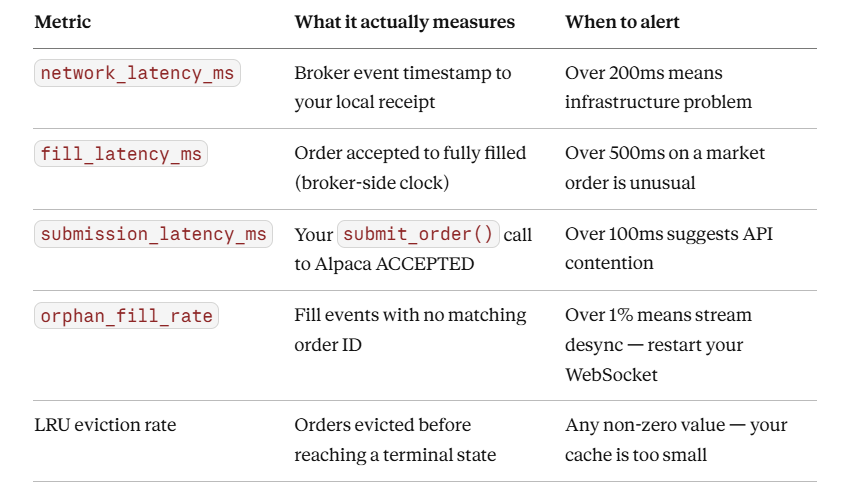
Watch for clock skew. Alpaca paper sandbox timestamps are server-side UTC. If data.timestamp is ever after your local_receipt_at, you have NTP drift on your machine. Negative network latency is physically impossible — log it as a warning and don’t include those records in your latency percentile calculations.
Homework — Production Challenge
Extend OrderLifecycle with a slippage calculator.
For limit orders, slippage is defined as:
slippage_bps = (avg_fill_price - limit_price) / limit_price * 10_000
For market orders, slippage requires knowing the mid-quote at the time of submission. Add a mid_at_submit: float field to OrderLifecycle, populate it when you call mark_submitted(), then compare against avg_fill_price at the fill.
Add a new check to verify.py that asserts every FILLED limit order has |slippage_bps| < 10.
Pass condition for Day 41: Your verifier must output ✅ PASS on the slippage check for all orders. If you’re seeing over 10 bps slippage on paper market orders, your order is crossing the spread multiple times — that’s a position sizing problem, not a timestamp problem.