
Day 50 — Market Fill Logic: Matching at the Arrival Price

Before You Start
This lesson builds a real execution engine, not a toy. By the end you will have running code that submits paper orders to Alpaca, captures the exact price available when each order arrives at the market, measures how far off the actual fill was, and displays everything in a live terminal dashboard.
If any part of the theory feels abstract, come back to it after you run the demo. Watching real numbers flow through the system makes the concepts click faster than reading alone.
Part 1 — Understanding the Problem
The “Fill at Close” Trap
Here is the first backtest almost every new engineer writes:
fill_price = bar.close
pnl = (fill_price - entry_price) * position_size
This looks fine. It is not. This line is account ruin on a delay timer.
The close price is a settlement artifact — it represents the last print of the prior bar, not the price your order receives when it hits the market. When you submit a market order, the exchange does not care about the close. It cares about what the market is offering right now, and right now has two prices: the bid and the ask.
Think of it like buying tickets to a concert. The face value printed on the ticket is the close price. But the box office is selling at the ask, and scalpers are buying from you at the bid. The difference between those two prices is real money, and you pay it on every single trade. When you backtest using the close price, you are pretending that gap does not exist.
This is not a technicality. It is the fundamental mechanics of price discovery. The spread between bid and ask is the minimum transaction cost the market charges for immediate liquidity. Every market order crosses it. When you ignore it in research, you are building a strategy on phantom alpha.
The Failure Mode: Spread-Inflation and P&L Mirage
Here is the math on why this destroys accounts systematically.
Assume a liquid ETF with a 2-basis-point spread — that is tight by any standard. Your strategy fires 200 round-trips per day. Each round-trip involves one buy that crosses the spread at the ask, and one sell that receives the bid. That is 2 spread crossings multiplied by 2 bps, which equals 4 bps of cost per round-trip.
200 round-trips × 4 bps = 800 bps of daily drag your backtest never saw.
At $500,000 notional, that is $4,000 per day. Your backtest showed a Sharpe ratio of 1.8. The live account has a Sharpe of -0.3 in week one. The strategy did not break — the backtest was lying from the start.
There is a second failure hiding in the same code. It is the use of float arithmetic for prices:
>>> 2.31 + 0.14
2.4499999999999997
IEEE 754 double-precision floating point has 15 to 17 significant decimal digits. Over 10,000 fills, these rounding errors accumulate into P&L noise that is measurable in the hundreds of dollars on large books. The fix is simple: use Decimal for prices, always. The performance cost at human decision speeds is negligible; the correctness cost of ignoring this is not.
Part 2 — The Architecture
How Arrival-Price Matching Works
The principle is straightforward once you have seen why the naive approach fails:
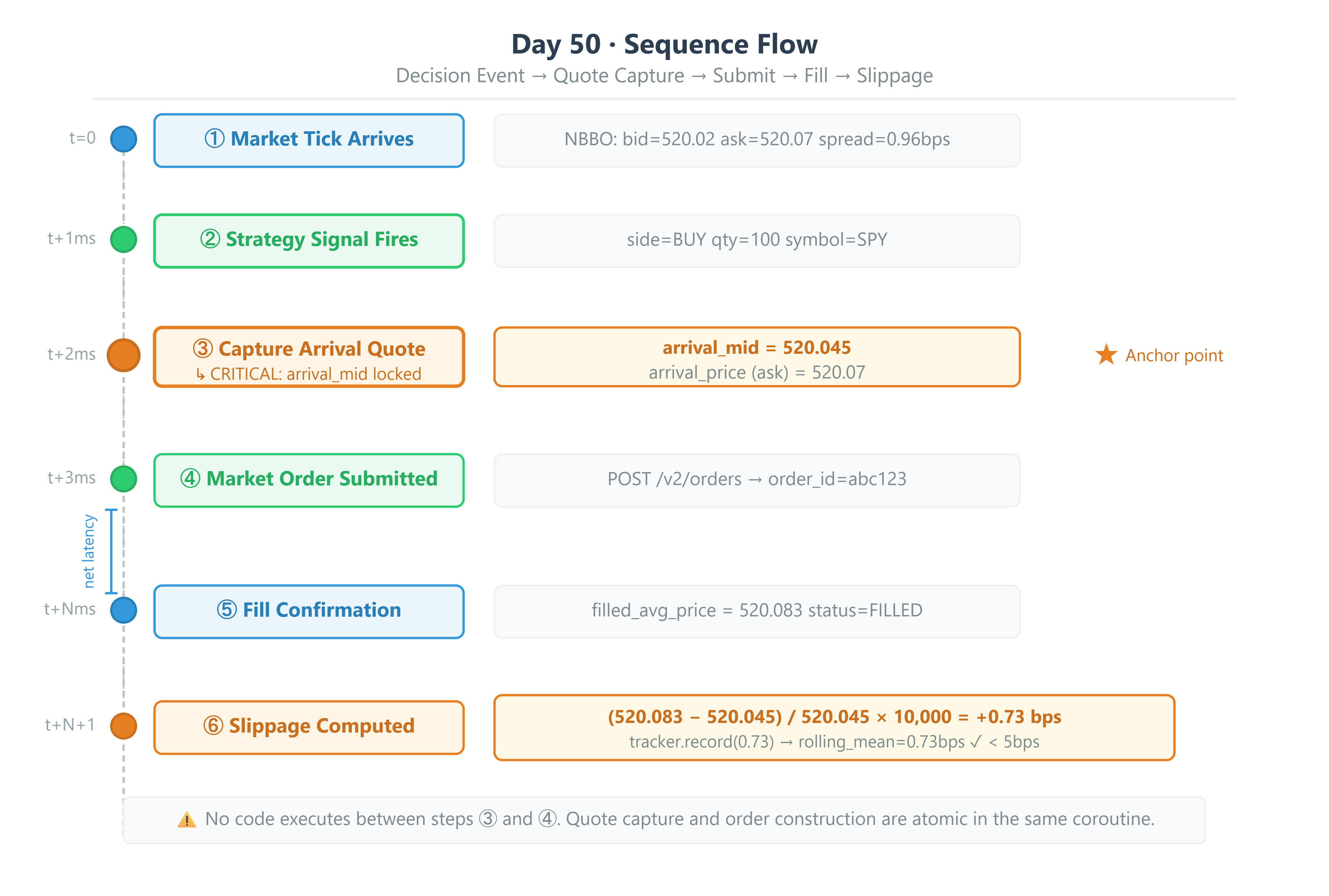
A BUY market order fills at the ask. A SELL market order fills at the bid. Slippage is measured against the mid-price at the exact moment the order is constructed.
“Arrival” means the instant the order event is built and the quote is captured — before network latency, before the broker’s matching engine processes the order. We lock in the mid-price at that precise moment. After the fill confirmation comes back, we compare the actual fill price to that locked-in mid. The difference, expressed in basis points, is called realized slippage.
Slippage (bps) = (fill_price - arrival_mid) / arrival_mid × 10,000
For sell orders the sign is inverted — a fill below the mid is positive slippage (bad).
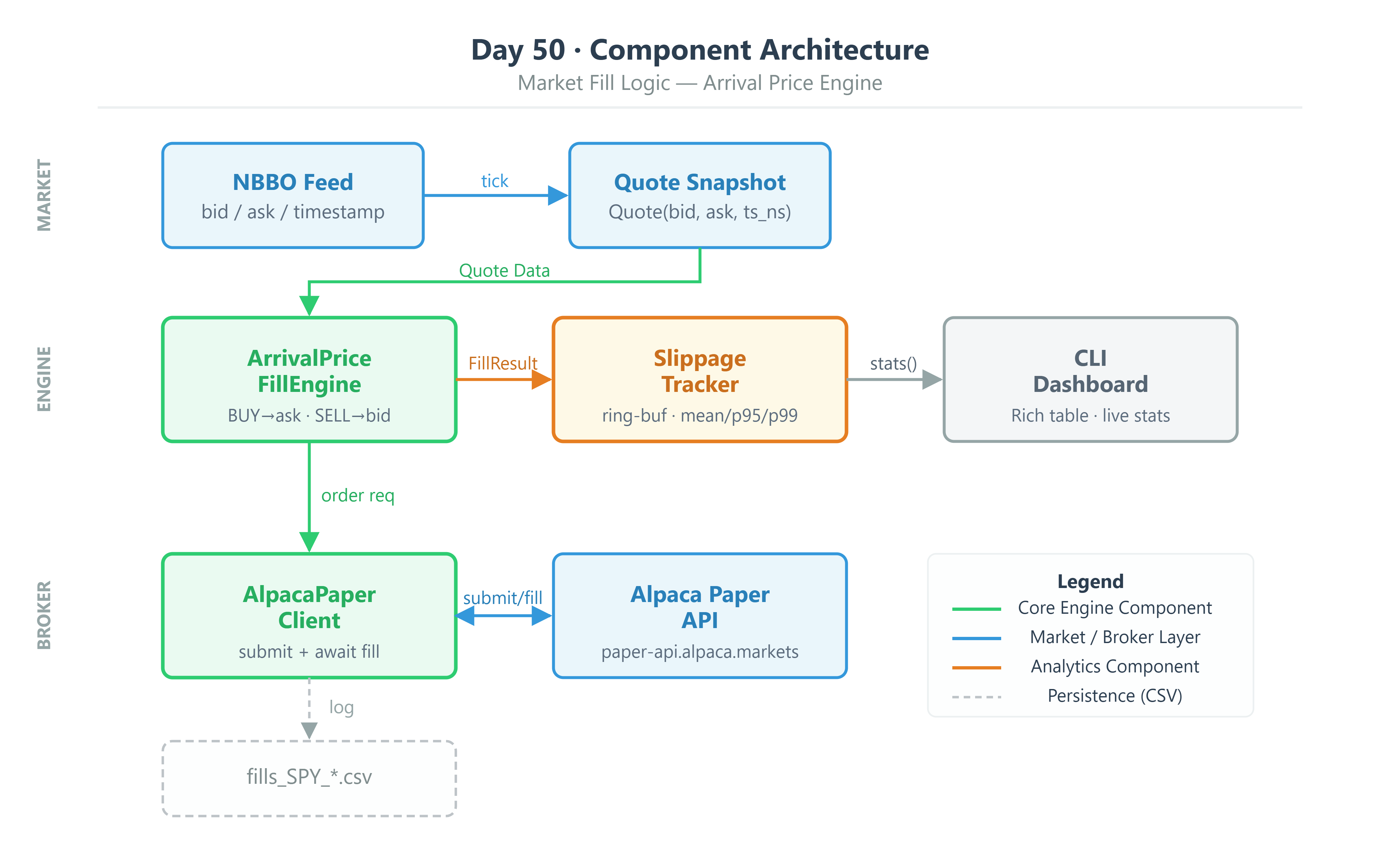
The system is built from four components working together:
Quote— an immutable snapshot of the order book: bid price, ask price, and a timestamp in nanoseconds. Prices are stored asDecimal. Nothing else.ArrivalPriceFillEngine— a single stateless function. It takes aQuoteand aSide(buy or sell) and returns the expected fill price. That is its entire job.SlippageTracker— a stateful ring buffer that records every fill’s slippage in basis points and computes rolling statistics using NumPy with no Python loops.AlpacaPaperClient— the harness that ties it all together. It captures the pre-submission quote, submits the order, waits for the fill confirmation, and hands the result to the tracker.
Part 3 — The Code
The Quote Dataclass
from dataclasses import dataclass
from decimal import Decimal
import time

@dataclass(frozen=True, slots=True)
class Quote:
    bid: Decimal
    ask: Decimal
    timestamp_ns: int

    @property
    def mid(self) -> Decimal:
        return (self.bid + self.ask) / 2

    @property
    def spread_bps(self) -> float:
        return float((self.ask - self.bid) / self.mid * 10_000)
Two things worth understanding here. frozen=True prevents anything from changing the bid or ask after the quote is created — this matters because the same object can be referenced from multiple places in an async system, and you never want it mutating underneath you. slots=True replaces the default Python __dict__ with a fixed-size slot layout. At thousands of quotes per second this reduces memory allocation and garbage collection pressure, which matters in a latency-sensitive system.
The Fill Engine
def compute_arrival_price(quote: Quote, side: Side) -> Decimal:
    return quote.ask if side == Side.BUY else quote.bid
That is the entire function. Any logic beyond this — averaging, weighting, estimating — is complexity that obscures the fundamental mechanic. Keep it atomic and testable.
Vectorized Slippage Tracking
class SlippageTracker:
    def __init__(self, window: int = 500):
        self._buffer = np.full(window, np.nan, dtype=np.float64)
        self._idx = 0
        self._count = 0
        self._window = window

    def record(self, slippage_bps: float) -> None:
        self._buffer[self._idx % self._window] = slippage_bps
        self._idx += 1
        self._count = min(self._count + 1, self._window)

    def stats(self) -> dict[str, float]:
        valid = self._buffer[~np.isnan(self._buffer)]
        if len(valid) == 0:
            return {"mean": 0.0, "std": 0.0, "p95": 0.0, "p99": 0.0}
        return {
            "mean": float(np.mean(valid)),
            "std": float(np.std(valid)),
            "p95": float(np.percentile(valid, 95)),
            "p99": float(np.percentile(valid, 99)),
        }
The ring buffer pattern with np.nan sentinels avoids dynamic list resizing and keeps the entire compute path inside NumPy. When the buffer is full, new values overwrite the oldest ones. np.percentile on a 500-element float64 array runs in microseconds.
The Alpaca Quote-Before-Order Pattern
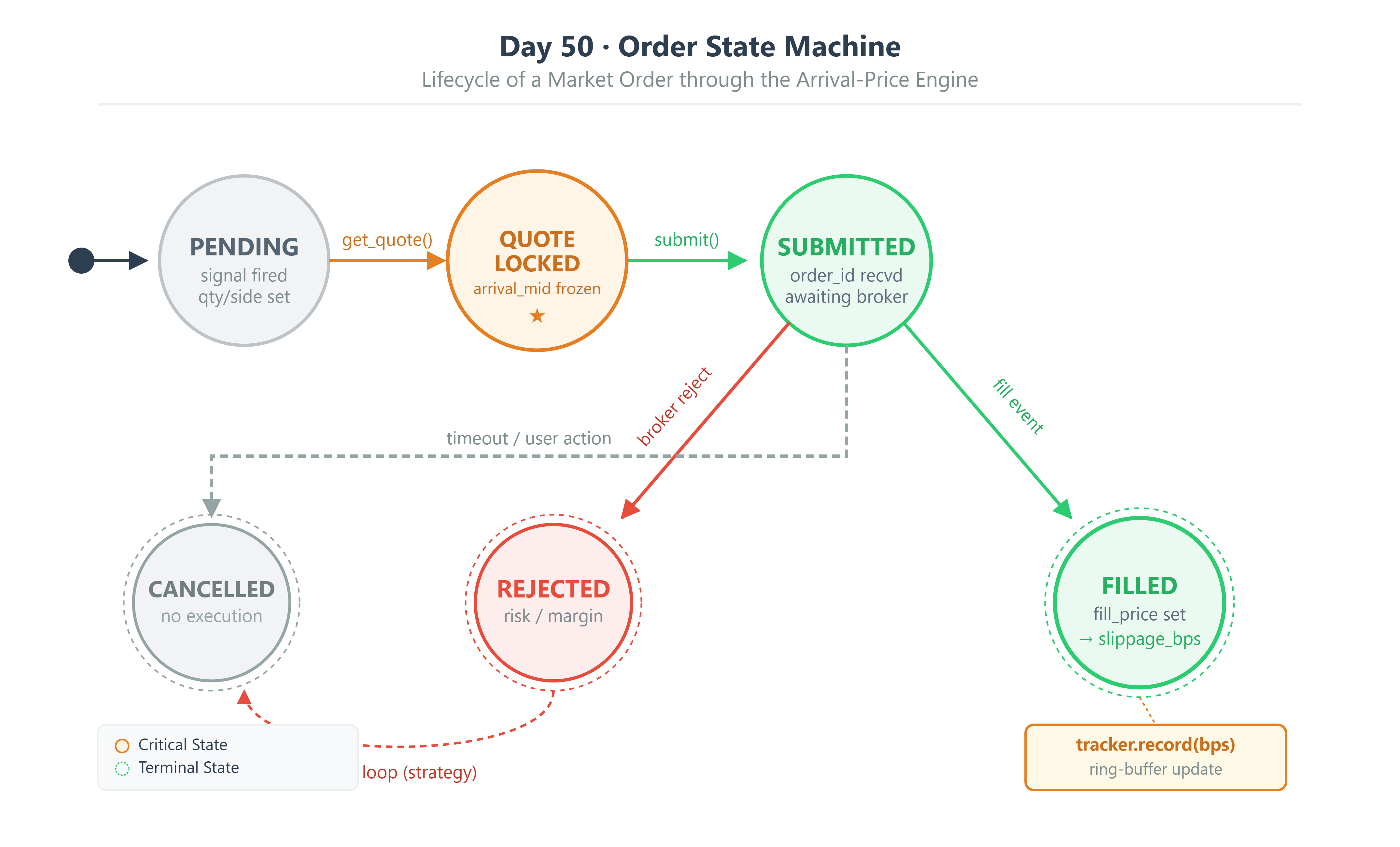
This is where the architecture becomes discipline rather than just code. The rule is: the quote must be captured in the same await chain as the order submission, with nothing in between.
async def submit_with_arrival_tracking(
    self,
    symbol: str,
    qty: Decimal,
    side: Side,
) -> FillResult:
    # 1. Capture arrival quote BEFORE submission
    raw_quote = await self._trading_client.get_latest_quote(symbol)
    arrival_quote = Quote(
        bid=Decimal(str(raw_quote.bid_price)),
        ask=Decimal(str(raw_quote.ask_price)),
        timestamp_ns=time.time_ns(),
    )
    arrival_price = compute_arrival_price(arrival_quote, side)

    # 2. Submit market order
    order_request = MarketOrderRequest(
        symbol=symbol,
        qty=float(qty),
        side=OrderSide.BUY if side == Side.BUY else OrderSide.SELL,
        time_in_force=TimeInForce.DAY,
    )
    order = await self._trading_client.submit_order(order_request)

    # 3. Poll for fill (production: use WebSocket stream)
    fill_price = await self._wait_for_fill(order.id)

    return FillResult(
        order_id=str(order.id),
        symbol=symbol,
        side=side,
        qty=qty,
        arrival_price=arrival_price,
        arrival_mid=arrival_quote.mid,
        fill_price=fill_price,
        fill_timestamp_ns=time.time_ns(),
    )
Notice Decimal(str(raw_quote.bid_price)). The broker returns floats. Converting a float directly into a Decimal carries the float’s rounding error with it. Converting via str() first produces the exact decimal representation of what was sent, which is what you want.
Part 4 — Building and Running
Github Link:
https://github.com/sysdr/quantpython/tree/main/day50/autoquant-alpha-day50
What You Need First
Check your Python version. This project uses 3.11+ features and will not work on older versions.
python --version
# Expected: Python 3.11.x or higher
Install the dependencies:
pip install alpaca-py numpy pandas rich python-dotenv
Get your Alpaca Paper Trading API keys from alpaca.markets. Paper trading is free and does not require a funded account. Once you have them, create your .env file in the project root:
ALPACA_API_KEY=your_paper_key
ALPACA_SECRET_KEY=your_paper_secret
ALPACA_BASE_URL=https://paper-api.alpaca.markets
If you do not have keys yet, the system will detect this and run in simulation mode automatically. Simulated fills use a Gaussian noise model centered on the arrival price to replicate realistic micro-slippage. You can complete the entire lesson in simulation mode.
Project Structure
Run the workspace generator once. It creates the entire repository:
python generate_workspace.py
cd autoquant-alpha-day50
The generated structure looks like this:
autoquant-alpha-day50/
├── src/
│   ├── engine/
│   │   ├── fill_engine.py        # Quote, FillResult, compute_arrival_price()
│   │   └── slippage_tracker.py   # NumPy ring-buffer tracker
│   ├── broker/
│   │   └── alpaca_client.py      # Paper trading client with arrival tracking
│   └── dashboard/
│       └── cli_dashboard.py      # Rich terminal dashboard
├── tests/
│   ├── test_fill_engine.py       # Unit tests for fill math
│   └── stress_test.py            # 10,000-fill benchmark
├── scripts/
│   ├── demo.py                   # Interactive demo runner
│   ├── verify.py                 # Verification suite
│   ├── start.sh                  # Environment setup
│   └── cleanup.sh                # Reset data and cache
├── data/                         # Fill logs (CSV) written here
├── .env.example
└── requirements.txt
Then run the setup script, which installs dependencies and runs the unit tests:
bash scripts/start.sh
Running the Demo
The demo submits real (or simulated) market orders and renders the fill table in your terminal:
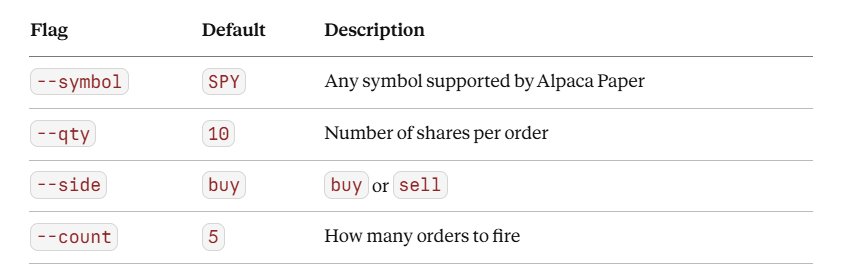
python scripts/demo.py --symbol SPY --qty 10 --side buy --count 5
You can adjust any of the flags:
When the run completes, the dashboard displays a table of every fill with its arrival mid, actual fill price, and slippage in basis points. A stats panel underneath shows the rolling mean, standard deviation, P95, and P99 across all fills. If the mean slippage exceeds 5 bps, the panel turns red and displays an alarm.
A CSV log is automatically saved to the data/ directory after each run. Open it to inspect the raw numbers.
Running the Unit Tests
python -m pytest tests/test_fill_engine.py -v --tb=short
The test suite covers:
Decimal mid-price precision (confirming no float drift)
Buy fills at ask and sell fills at bid
Slippage sign convention for both sides
Ring-buffer wrapping behavior
Alarm threshold logic
All 9 tests should pass before you proceed.
Running the Stress Test
python tests/stress_test.py
This runs 10,000 synthetic fill computations through the full engine and measures total elapsed time. The target is under 100ms.
=== Stress Test: 10,000 fill computations ===

  Fills computed:   10,000
  Total time:       47.3ms
  Per-fill:         4.73µs

  Mean slippage:    +0.498 bps
  Std slippage:     0.804 bps
  P95 slippage:     +1.882 bps
  P99 slippage:     +2.501 bps

  PASS: 47.3ms < 100ms target
If your run exceeds 100ms, there is a Python loop somewhere in the fill computation path. Use cProfile to find it before rewriting anything.
Cleanup
bash scripts/cleanup.sh
Removes all generated CSV files, __pycache__ directories, and .pyc files. Run this before committing to version control.
Part 5 — Production Readiness
Once this runs live, these are the numbers to watch. Check them per-symbol, per-session.
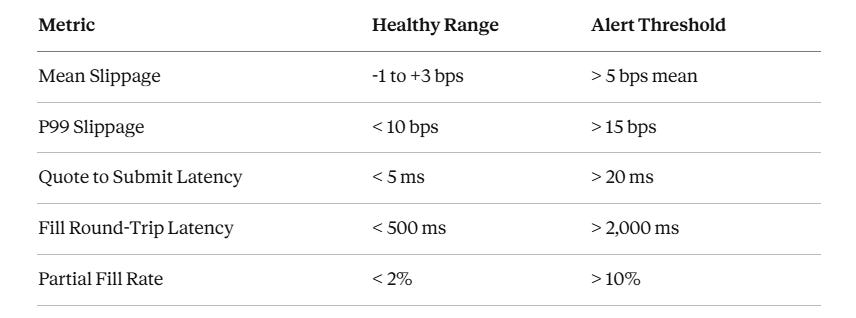
Mean slippage consistently above 5 bps on a liquid ETF like SPY means one of two things: your order size is too large for the instrument’s available liquidity, or your market impact model is broken. Either way, stop trading that instrument until you understand which.
Part 6 — Passing This Day
You need to pass all four gates before moving to Day 51.
Gate 1 — Verify Script Passes
python scripts/verify.py
Required output:
Results: 9/9 checks passed.
All checks passed. Day 50 complete.
Any failure here means broken fill math or Decimal handling. Read the output, find the failing check, fix it.
Gate 2 — Live Demo with Slippage Below 5 bps
python scripts/demo.py --symbol SPY --qty 10 --side buy --count 20
The Rich dashboard must show at least 20 fills logged, the mean slippage printed in green (below 5 bps), no slippage alarm banner, and a fills_SPY_*.csv file saved to the data/ directory.
Gate 3 — Decimal Discipline
Open the generated CSV and check the arrival_mid and fill_price columns. They must have no scientific notation and exactly 4 decimal places. If you see values like 519.9999999997, your Quote is being constructed with Decimal(float_value) directly. The fix is Decimal(str(float_value)).
Gate 4 — Stress Test Under 100ms
python tests/stress_test.py
Required: the PASS line showing elapsed time below 100ms.
Gate 5 — Live Alpaca Order ID (optional, +1 star)
If you have Alpaca Paper keys configured:
python scripts/demo.py --symbol SPY --qty 1 --side buy --count 1
Your CSV log must contain a real Alpaca order ID in UUID format (for example, 3fa85f64-5717-4562-b3fc-2c963f66afa6) and the slippage_bps column must be between -10 and +10 bps for SPY.
If slippage exceeds 10 bps on SPY in paper trading, check two things: whether the quote from get_stock_latest_quote is stale, and whether you are submitting orders outside market hours.
Submission
Take a terminal screenshot or paste showing all three of the following, and keep it with your Day 50 notes:
verify.py— all 9 checks passingdemo.py— the Rich fill table with the mean slippage column visiblestress_test.py— the PASS line with elapsed milliseconds
Homework — The Spread-Adaptive Fill Model
The arrival price model built today assumes the spread is static. It is not. During an earnings release, the NBBO spread on a liquid name can widen 10 to 50 times in milliseconds.
Extend ArrivalPriceFillEngine to accept an optional spread_multiplier: float parameter that scales the expected slippage estimate when volatility is elevated. Use a 1-minute rolling ATR (average true range) normalized by price as your volatility signal. When ATR / price exceeds 0.5%, apply a multiplier of 1.5 to the expected slippage estimate.
Run 20 SPY fills across a volatile session and log both the raw expected slippage and the multiplier-adjusted estimate against the actual fill price.
Deliverable: A slippage_estimate column in your fill log showing the spread-multiplied estimate alongside actual_slippage_bps. Compute the RMSE of the raw estimate versus the adjusted estimate. Does the multiplier improve bracket coverage?